
Discover powerful Dolibarr extensions designed to automate your business processes
Showroom Management (technical name gestionshowroom, class modGestionShowroom, table prefix llx_shr_) is a comprehensive Dolibarr ERP/CRM module that turns a standard Dolibarr instance into...
Couldn't load pickup availability


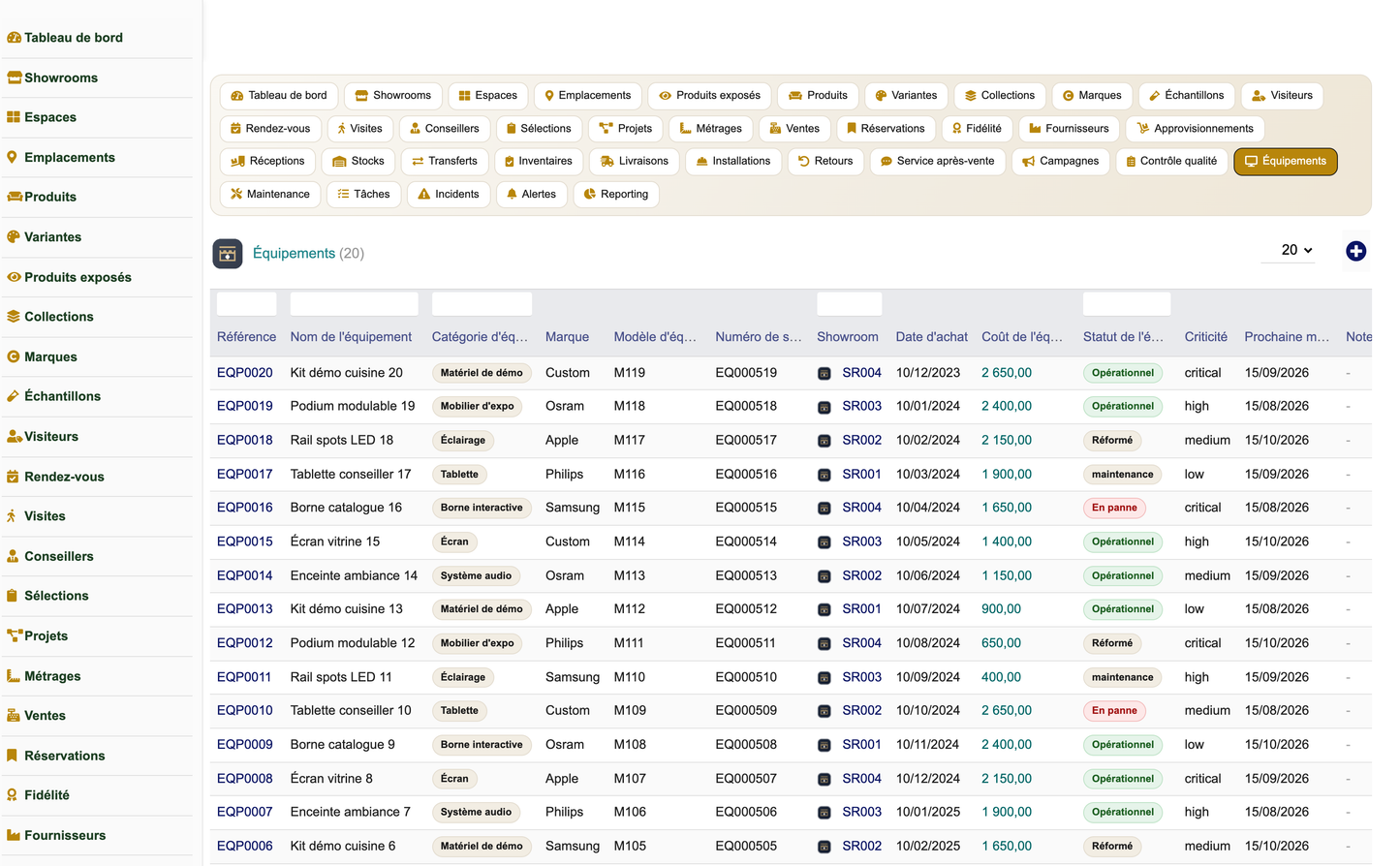
Showroom Management (technical name gestionshowroom, class modGestionShowroom, table prefix llx_shr_) is a comprehensive Dolibarr ERP/CRM module that turns a standard Dolibarr instance into a complete management solution for showrooms and exhibition spaces. Published by DoliResources under module number 966000, version 1.0, it belongs to the Products family, depends on the native Societe (third parties) and Product modules, and runs on Dolibarr 16 or later with PHP 7.1 or later.
The module addresses the entire showroom life cycle in a single, coherent application: catalogue definition, exhibition layout, visitor reception, appointment scheduling, needs qualification, product presentation, customer selections, sampling, on-site measurements, quotation, negotiation, ordering, payment, preparation, delivery, installation, handover, after-sales service, and performance analysis. It is built on Dolibarr's generic CommonObject engine with 41 business objects, 39 left-menu entries plus a top entry, a rich analytical dashboard, a reporting suite, and a REST API.
Gestion Showroom is designed for a wide range of physical retail and demonstration environments: furniture and kitchen showrooms, bathroom and tiling displays, building-materials and decoration spaces, lighting studios, appliance retailers, joinery workshops, automotive showrooms, art galleries, demonstration centres, and multi-brand showroom networks.
The primary objective of the module is to unify the fragmented tools that showroom operators typically rely on — spreadsheets for visitor tracking, separate quoting systems, disconnected stock records, and manual delivery planning — into one integrated platform anchored in Dolibarr's proven ERP foundations. By connecting the physical exhibition space to the commercial and logistics back office, the module makes every square metre of display area measurable and every visitor interaction traceable.
A second objective is to maximise conversion along the customer journey. Because each stage — from the first visit to final installation and after-sales — is captured as structured data, managers can identify where prospects drop off, which advisors perform best, which collections generate the most revenue, and which displayed products deserve their floor space. The result is a data-driven approach to merchandising, staffing, and inventory that raises the return on a costly physical asset.
The module is aimed at any business that sells through a physical exhibition environment where products are displayed, demonstrated, sampled, and configured before purchase. This includes furniture and kitchen retailers, bathroom and tiling specialists, building-materials and decoration outlets, lighting studios, home-appliance stores, joinery and carpentry businesses, automotive dealerships, art galleries, and manufacturer demonstration centres.
It suits both single-site operators and multi-brand showroom networks that manage several exhibition spaces, need inter-site transfers, and require consolidated reporting across locations. The multi-entity awareness inherited from Dolibarr allows a group to operate distinct showrooms while sharing a common catalogue and reporting framework.
Gestion Showroom serves the full spectrum of showroom staff. Sales advisors use it to greet visitors, qualify needs, build product selections, prepare quotes, and close sales. Showroom managers use the dashboard and reporting suite to steer performance, plan staffing, and monitor exhibition occupancy. Back-office and logistics teams handle purchasing, receptions, stock, transfers, deliveries, and installations.
Marketing teams manage campaigns and loyalty, quality teams handle controls and after-sales claims, and administrators configure permissions, demo data, and module settings. Each user only sees what their permission group allows, so the same instance safely supports a mixed team from front-of-house advisors to head-office analysts.
The Showroom object is the central hub of the module. Each showroom represents a physical site and acts as the anchor to which spaces, locations, displayed products, stock, staff, sales, and reporting are attached. A showroom network can therefore run several showrooms in parallel while keeping their data cleanly separated and consolidable.
From the Showrooms menu, managers create and maintain their sites, and the dashboard and reporting suite let revenue, footfall, and exhibition metrics be broken down per showroom — for example revenue by showroom in both the analytics graphs and the dedicated report.
Within each showroom, exhibition areas are modelled at two levels. The Space object represents a larger exhibition zone (for example a kitchen area or a bathroom area), while the Location object represents an individual display location or emplacement within a space where a specific product is exhibited. The demo dataset alone illustrates the scale this supports, with 23 spaces and 102 locations across 4 showrooms.
This two-tier structure feeds the interactive showroom plan on the dashboard, where a location-occupancy grid is coloured by status — free, occupied, reserved, or under maintenance — giving managers an at-a-glance view of how their floor space is used and where capacity is available.
The catalogue is organised around the Product object, which acts as a catalogue hub and is linked to the native Dolibarr Product so that pricing, references, and stock benefit from Dolibarr's standard product engine. Products are grouped by Brand, and the module manages 10 brands and 40 catalogue products in its demonstration data alongside the corresponding native Dolibarr products.
Product diversity is handled through the Variant object, which captures the declinations of a catalogue product (such as finish, dimension, or colour). The demo dataset includes 100 variants, and both products and variants are exposed through the REST API for integration with external systems.
The DisplayedProduct object — the produit exposé — is a dedicated hub that represents a specific physical item placed on display. It carries rich attributes including serial number, condition, display status, install and removal dates, public and display price, and the allowed discount, together with counters for demos, views, selections, and quotes generated by that item.
This makes each exhibited product measurable as a commercial asset: managers can see which items attract attention and generate quotes, which are due for replacement, and how discounting is governed per item. The dashboard highlights displayed-product totals and items to replace, and a dedicated Product exhibition report analyses exhibition performance.
The Collection object groups products into ambiances, styles, or seasonal ranges, reflecting the way showrooms merchandise coordinated looks rather than isolated items. Collections let advisors present a coherent atmosphere to visitors and help buyers imagine a complete result.
Commercially, collections are a reporting dimension in their own right: the reporting suite includes a Sales by collection report so that managers can see which curated ranges drive revenue and plan future collections accordingly.
The Sample object (échantillon) manages the loan of material samples such as fabric, tile, or finish swatches. Each sample record tracks its type, the borrower, the out and return dates, and any deposit taken, so that valuable samples are not lost and returns are followed up. The demonstration data includes 30 samples.
Sample circulation is integrated into the wider workflow: visits record samples taken out, the dashboard surfaces overdue samples, and a dedicated alert flags samples that are late for return, protecting the showroom against loss and keeping the sample library complete.
The Visitor object is a hub that captures every prospect who enters the showroom, recording visitor type, source, expressed need, budget, marketing consent, and status. With 60 visitors in the demo data, it forms the top of the commercial funnel and the basis for conversion analysis.
Because consent and source are stored, the module supports compliant marketing follow-up and lets managers measure which channels bring the most valuable footfall. The Footfall and sources report ties visitor volume and origin to conversion, closing the loop between marketing spend and showroom results.
The Appointment object schedules meetings between visitors and advisors, recording the appointment type, date, assigned advisor, room, status, and a report of the meeting. The demo dataset contains 50 appointments, and upcoming and same-day appointments are surfaced prominently on the dashboard.
Appointment discipline is measurable: the dashboard tracks the appointments-honoured rate, helping managers understand how reliably booked meetings translate into actual visits and, ultimately, into sales.
Gestion Showroom explicitly models the complete customer journey rather than isolated transactions. The path runs from catalogue and exhibition layout, through visitor reception, appointments, and needs qualification, into product presentation, selections, samples, and on-site measurements, then to quotation and negotiation, order and payment, preparation, delivery, installation, and handover, and finally into after-sales service and performance analysis.
Modelling the journey end-to-end means that no stage is a black box. Each step produces structured data that feeds the dashboard and reports, so operators can see conversion, bottlenecks, and satisfaction across the whole experience rather than guessing at what happens between a first visit and a completed installation.
The Advisor (staff) object records each advisor's role, specialties, spoken languages, availability, and sales target. With 12 advisors in the demo data, the module supports scheduling, appointment assignment, and multilingual customer service in showrooms that serve diverse clienteles.
Advisor performance is a first-class metric: the dashboard shows advisors available today and a top-advisors ranking, while the Advisor performance report provides a structured comparison against targets, supporting fair evaluation and better staffing decisions.
The Selection object, with its SelectionLine detail, captures the set of products a customer is considering, including alternatives for comparison. This mirrors the real showroom behaviour of weighing several options side by side before committing. The demo data includes 25 selections.
Selections bridge browsing and buying: they can carry alternatives so an advisor can present comparable products, and they feed naturally into projects and quotations as the customer's preferences firm up.
The Project object represents a customer project such as a full kitchen or bathroom fit-out, recording project type, budget, a status pipeline, and the amounts quoted and ordered. The demo data contains 22 projects, and active projects are tracked on the dashboard.
Projects give structure to complex, multi-product sales that unfold over time. The project pipeline is both a dashboard graph and a dedicated report, letting managers forecast revenue and see how many projects are progressing through each stage from initial interest to confirmed order.
The Measurement object (prise de mesures) records the dimensions taken at the customer's premises — room, length, width, and height — together with any constraints and a validation flag. The demo data includes 15 measurements.
Accurate measurements are essential for made-to-fit products such as kitchens, wardrobes, and tiling. Capturing them as structured, validated records reduces costly ordering and installation errors and links the physical site conditions directly to the quotation and installation stages.
Quotation is a core step of the journey, and the module ties selections, projects, and measurements into priced offers. Displayed products carry public and display prices and an allowed discount, so advisors can build accurate quotes while respecting margin governance, and quote counters on displayed products show which items generate the most offers.
The dashboard tracks quotes to prepare and flags expiring quotes through a dedicated alert, ensuring that no offer is left to lapse and that follow-up happens while the customer is still engaged. Quotation integrates with Dolibarr's native Quotes so the module builds on standard commercial documents.
The Sale object with its SaleLine detail represents the checkout ticket, capturing the sales channel, payment, and margin for each transaction. With 120 sales spread over 13 months in the demo data, the module provides a realistic basis for revenue and margin analysis from the very first activation.
Sales feed the dashboard's commercial zone directly, driving daily, monthly, and yearly revenue, target attainment, average basket, and gross margin and margin rate. Multiple reports — sales by month, revenue by showroom, sales by category, and sales by collection — slice this data along the dimensions managers care about most.
The Reservation object lets a showroom hold a product for a customer, supporting several reservation kinds: firm, option, display, and sample. This flexibility matches real situations where a customer wants to secure an item, an advisor wants to hold a display piece, or a sample needs to be earmarked.
Active reservations appear on the dashboard, an expiring-reservation alert prevents holds from silently lapsing, and reservations can be created through the REST API, enabling integration with external booking or e-commerce front ends.
Stock is modelled with awareness of the special nature of showroom inventory. The Stock object distinguishes several kinds — available, reserved, displayed, sample, transit, damaged, and returned — so that items on the floor or out as samples are never confused with sellable stock. Physical counting is supported by the Inventory object with its InventoryLine detail.
This granularity gives an accurate, real-time picture of where every item is and in what state. Stock-out and low-stock alerts protect availability, and stock levels are exposed through the REST API for integration with wider supply-chain systems.
The Transfer object manages the movement of stock between showrooms in a network. This supports the common situation where an item requested at one site is available at another, or where displayed pieces are rotated between showrooms to refresh exhibitions.
By recording transfers as structured movements, the module keeps each showroom's stock accurate during inter-site logistics and gives network operators visibility over how inventory circulates across their sites.
Upstream logistics are handled by the Supplier hub, the Supply object with its SupplyLine detail representing purchase orders, and the Reception object with its ReceptionLine detail representing goods receipts. The demo data includes 10 suppliers, giving a complete purchase-to-receipt chain within the module.
This closes the loop between demand and supply: products selected and sold in the showroom drive purchase orders to suppliers, receptions update stock, and quality controls can be applied on reception, so that the exhibition floor is reliably replenished.
The Delivery object plans and tracks the shipment of purchased goods to the customer, recording the delivery address, time slot, carrier, number of packages, and status. Same-day deliveries are surfaced on the dashboard so that logistics teams can plan their day.
Structured delivery data means that the promise made at the point of sale is followed through to the customer's door, with clear status tracking that reduces missed slots and supports proactive communication.
The Installation object manages the on-site fitting of delivered products, recording the assigned technician, team, status, customer signature, and cost. Same-day installations appear on the dashboard alongside deliveries.
For showrooms selling fitted products such as kitchens, wardrobes, and bathrooms, installation is the moment the sale is fulfilled. Capturing signature and cost provides proof of completion and a basis for measuring installation profitability and workload.
The Return object handles returns and exchanges, recording the reason, type, refund, and status. A dedicated Returns and exchanges report lets managers analyse return volume and causes so that recurring issues — whether product, advice, or logistics related — can be addressed.
Handling returns as structured records protects customer satisfaction while giving the business the data it needs to reduce avoidable returns and manage the financial impact of refunds and exchanges.
The After-sales (claim) object manages post-purchase service requests, recording the category, priority, warranty status, satisfaction, and status of each case. This ensures that issues arising after installation are tracked to resolution rather than lost.
Because satisfaction and warranty are captured, after-sales becomes a source of insight as well as a service function: managers can monitor service quality, honour warranties consistently, and feed lessons back into product and supplier decisions.
The Campaign object manages marketing activity, recording the campaign type, channel, budget, the number of visitors and leads generated, the revenue produced, and the resulting ROI. A Campaign performance report analyses this ROI so that marketing spend can be directed to what works.
The Loyalty object rewards and segments customers across levels — classic, silver, gold, and VIP — with points and segment attributes. Together, campaigns and loyalty give the showroom the tools to attract new footfall and retain valuable customers, closing the marketing loop with measurable results.
The Showroom Cockpit dashboard organises key information into eight zones. Zone A (Today) shows visitors, appointments, upcoming appointments, advisors available, deliveries, installations, quotes to prepare, and open alerts for the day. Zone B (Sales) presents daily, monthly, and yearly revenue, monthly target and attainment rate, average basket, and gross margin and margin rate. Zone C (Visitor journey) covers total and new visitors, conversion rate, appointments-honoured rate, samples out, and satisfaction.
Zone D (Exhibition) reports displayed products, items to replace, overdue samples, catalogue references, active projects, and active reservations. Zone E (Analytics) uses DolGraph to render revenue evolution over 13 months, visits per month, revenue by category and by channel as pie charts, revenue by showroom as a bar chart, and the project pipeline as a bar chart. Zone F is the interactive showroom plan, a location-occupancy grid coloured by status.
Zone G provides rankings of top products and top advisors, and Zone H offers quick actions to register a visitor, create an appointment, start a selection or project, reserve a product, record a sale, schedule a delivery, or open the reporting suite. Together these zones give managers a single, actionable command centre for the whole showroom.
The reporting suite comprises ten reports, each exportable to CSV and printable: sales by month, revenue by showroom, sales by category, sales by collection, advisor performance, footfall and sources (with conversion), project pipeline, product exhibition, campaign performance (ROI), and returns and exchanges.
These reports turn the module's operational data into management insight along every meaningful dimension — time, site, category, collection, staff, marketing channel, and project stage — so that decisions about merchandising, staffing, purchasing, and marketing rest on evidence rather than intuition.
A customer-facing portal is on the module's roadmap. Building on the structured selection, project, quotation, and reservation data already captured, a portal would let customers review their selections and projects, follow quotes and orders, and track delivery and installation progress online.
The REST API already exposes many of the building blocks a portal requires — products, variants, displayed items, reservations (including creation), and dashboard KPIs — so the roadmap extends naturally from the current architecture without core modification.
Gestion Showroom is built to cooperate with Dolibarr's standard modules rather than replace them. It integrates with native Tiers (third parties), Products, Stock, Warehouses, Quotes, Orders, Invoices, Projects, and Agenda, so that showroom activity flows into the standard commercial and accounting chain and benefits from Dolibarr's mature document and stock management.
Crucially, the module makes no core modification. It uses the native database layer, GETPOST input handling, the translation system, CSRF protection, and the multi-entity framework, and it is extrafields-ready, so it upgrades cleanly alongside Dolibarr itself.
The module exposes a REST API under /api/index.php/gestionshowroom/ with fourteen routes. GET routes cover showrooms, spaces, products, a single product by id, variants, displayed products, visitors, appointments, projects, stocks, sales, reservations, and dashboard KPIs, while a POST route creates reservations.
The API is secured to the same standard as the rest of the module: it authenticates through DolibarrApiAccess and the current user, guards each route by the relevant permission group, and whitelists sort fields to prevent injection. This makes safe, controlled integration with external systems and future front ends straightforward.
Access is governed by 35 rights organised into 12 permission groups: showroom, catalog, purchase, stock, visitors, sales, projects, logistics, marketing, quality, maintenance, and reporting. Every non-reporting group provides read, write, and delete rights, the reporting group is read-only, and an additional administrative right governs configuration. Read and write are granted by default on activation so a team is productive immediately, while delete and admin remain deliberate grants.
All 39 left-menu entries are right-gated, so users only see the areas they are entitled to use. Combined with CSRF protection, whitelisted API sort fields, and entity-aware data separation, the permission model lets a single instance safely serve a mixed team from front-of-house advisors to head-office administrators.
The module ships fully translated into five languages — French, English, Spanish, Italian, and German — with 1170 translation keys each. No business string is hard-coded in PHP, and coded values are rendered through a shared vocabulary map so that the same underlying data reads correctly in every language.
This makes Gestion Showroom suitable for international showroom networks and multilingual teams, where advisors and customers may each prefer a different language while working from the same consistent data.
On first activation, a seeder creates a coherent, fully FK-linked demonstration dataset: 4 showrooms, 23 spaces, 102 locations, 40 catalogue products plus native Dolibarr products, 100 variants, 60 displayed products, 30 samples, 10 brands, 10 suppliers, 60 visitors, 50 appointments, 50 visits, 12 advisors, 25 selections, 22 projects, 15 measurements, and 120 sales spread over 13 months, together with deliveries, installations, returns, after-sales cases, campaigns, loyalty records, controls, equipment, maintenance, tasks, incidents, and alerts. This lets evaluators explore a realistic showroom immediately.
Every demo row is tagged with the import key SHRDEMO. A secure "empty demo data" action purges only the tagged rows, together with their cascade and the native products and customers the seeder created. The action is CSRF-guarded, admin-only, and protected by a versioned dataset guard, so demonstration data can be removed cleanly without touching real business records.
The following list summarises every business object and major capability provided by the module:
· Showroom management — central hub anchoring all sites in a network
· Exhibition Space management — larger display zones within each showroom
· Location management — individual display emplacements within spaces
· Brand management — organising the catalogue by brand
· Product catalogue — catalogue hub linked to native Dolibarr Product
· Variant management — product declinations (finish, dimension, colour)
· Displayed (exhibited) product management — serial, condition, status, prices, discount, demo/view/selection/quote counters, install/removal dates
· Collection management — ambiances, styles, and seasonal ranges
· Sample management — type, borrower, out/return dates, deposit
· Supplier management — purchasing hub
· Supply and SupplyLine — supplier purchase orders
· Reception and ReceptionLine — goods receipts
· Stock management — available/reserved/displayed/sample/transit/damaged/returned kinds
· Inventory and InventoryLine — physical stock counting
· Visitor management — type, source, need, budget, consent, status
· Appointment management — type, date, advisor, room, status, report
· Visit management — arrival/departure, products viewed, spaces visited, samples out, result, satisfaction
· Advisor/staff management — role, specialties, languages, availability, sales target
· Selection and SelectionLine — customer selections with alternatives for comparison
· Project management — type, budget, status pipeline, amounts quoted and ordered
· On-site measurement — room, length/width/height, constraints, validation
· Reservation management — firm, option, display, and sample kinds
· Transfer management — inter-showroom stock movement
· Sale and SaleLine — checkout ticket with channel, payment, margin
· Delivery management — address, slot, carrier, packages, status
· Installation management — technician, team, status, signature, cost
· Return management — reason, type, refund, status
· After-sales/claim management — category, priority, warranty, satisfaction, status
· Marketing campaign management — type, channel, budget, visitors/leads generated, revenue, ROI
· Loyalty management — classic/silver/gold/vip levels, points, segment
· Quality control management — quality and reception controls
· Equipment management — demonstration equipment hub
· Maintenance management — upkeep of equipment
· Task management — operational tasks
· Incident management — issue tracking
· Alert management — stockout, low-stock, sample-late, reservation-expiry, quote-expiry, display-replace, and appointment alerts
· Showroom Cockpit dashboard — eight zones (Today, Sales, Visitor journey, Exhibition, Analytics, Interactive plan, Rankings, Quick actions)
· DolGraph analytics — revenue evolution, visits per month, revenue by category/channel/showroom, project pipeline
· Interactive showroom plan — location-occupancy grid coloured by status
· Reporting suite — ten CSV-exportable, printable reports
· REST API — 14 rights-guarded routes including reservation creation and dashboard KPIs
· Role-based security — 35 rights across 12 permission groups, all menus right-gated
· Multilingual support — French, English, Spanish, Italian, German (1170 keys each)
· Demo data seeder with secure, CSRF-guarded, admin-only removal of tagged rows
· Native Dolibarr integration — Tiers, Products, Stock, Warehouses, Quotes, Orders, Invoices, Projects, Agenda
· No core modification — self-healing schema, de-duplicated menus, extrafields-ready, multi-entity aware
The module implements 41 business objects on Dolibarr's generic CommonObject engine. They are grouped below by functional area.
|
Functional Area |
Business Objects |
|
Showroom & Exhibition |
Showroom, Space, Location, Collection, DisplayedProduct |
|
Catalogue |
Brand, Product, Variant, Sample |
|
Purchasing & Suppliers |
Supplier, Supply, SupplyLine, Reception, ReceptionLine |
|
Stock & Inventory |
Stock, Inventory, InventoryLine, Transfer |
|
Visitors & Reception |
Visitor, Appointment, Visit |
|
Staff |
Advisor/Staff |
|
Commercial |
Selection, SelectionLine, Project, Measurement, Reservation, Sale, SaleLine |
|
Logistics & Fulfilment |
Delivery, Installation, Return |
|
Service |
After-sales/Claim |
|
Marketing |
Campaign, Loyalty |
|
Quality & Equipment |
Control, Equipment, Maintenance |
|
Operations |
Task, Incident, Alert |
Note: SelectionLine, SupplyLine, ReceptionLine, InventoryLine, and SaleLine are line-level detail objects, bringing the total to 41 business tables.
Access is controlled by 35 rights across 12 permission groups. Each non-reporting group provides read, write, and delete rights; the reporting group is read-only; and a separate administrative right governs configuration. Read and write are granted by default on activation.
|
Permission Group |
Rights |
Scope (examples) |
|
showroom |
Read, Write, Delete |
Showrooms, spaces, locations, displayed products, collections |
|
catalog |
Read, Write, Delete |
Brands, products, variants, samples |
|
purchase |
Read, Write, Delete |
Suppliers, supplies, receptions |
|
stock |
Read, Write, Delete |
Stock, inventories, transfers |
|
visitors |
Read, Write, Delete |
Visitors, appointments, visits |
|
sales |
Read, Write, Delete |
Selections, sales, reservations, loyalty |
|
projects |
Read, Write, Delete |
Projects, measurements |
|
logistics |
Read, Write, Delete |
Deliveries, installations, returns |
|
marketing |
Read, Write, Delete |
Campaigns, loyalty programmes |
|
quality |
Read, Write, Delete |
Controls, after-sales, incidents |
|
maintenance |
Read, Write, Delete |
Equipment, maintenance, tasks |
|
reporting |
Read only |
Reporting suite and dashboard analytics |
|
admin |
Administrative |
Module configuration, demo data, permissions |
The 12 functional groups combined with read/write/delete rights, the read-only reporting group, and the administrative right total 35 individual rights. All 39 left-menu entries are gated against these permissions.


