
Discover powerful Dolibarr extensions designed to automate your business processes
Stock & Inventory Management turns Dolibarr into a complete multi-warehouse stock and inventory management...
Couldn't load pickup availability


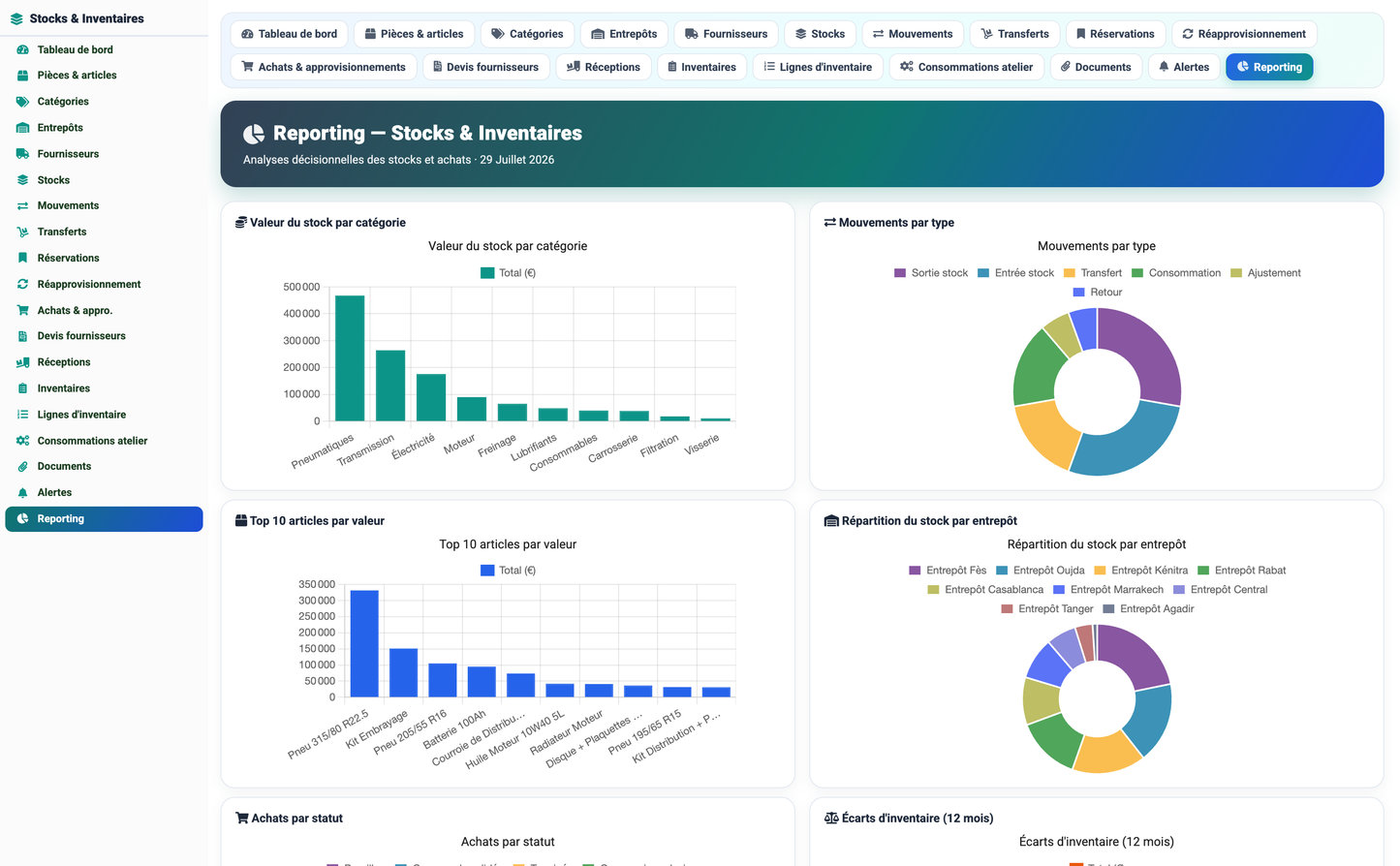
Stock & Inventory Management turns Dolibarr into a complete multi-warehouse stock and inventory management platform. Inspired by the DigiParc "Stocks & Inventaires" solution, the module covers the full lifecycle of spare parts and articles — from referencing and stock valuation to detailed movements, the end-to-end purchasing cycle, physical inventories with reconciliation, automatic replenishment alerts, and consumption of parts driven by CMMS (GMAO) maintenance work orders.
The module is fully self-contained: it manages its own articles, warehouses, suppliers, stock levels and movements in dedicated database tables, while integrating natively with Dolibarr Third Parties and Users. It ships with a modern dashboard, a decision-analytics reporting workspace, a replenishment board, and a rich, realistic demonstration dataset.
· Visibility — Give a real-time, consolidated view of stock value, availability and shortages across every site.
· Traceability — Guarantee traceability of every entry, exit, transfer, adjustment and return with quantities, references and totals.
· Procurement — Streamline the purchase cycle from request to reception, keeping documentary evidence at each step.
· Reconciliation — Reconcile theoretical vs physical quantities during inventories and correct variances with an audit trail.
· Anticipation — Anticipate shortages through minimum thresholds and automatic replenishment alerts.
· Integration — Feed workshop maintenance directly from stock so parts consumption updates levels automatically.
The module implements the six functional pillars of the DigiParc stock solution.
Run physical inventories on the built-in canvas or import counts from Excel-style files. The module detects variances, applies corrections and consolidates stock levels per warehouse and store. Each inventory campaign records the number of items counted, the number and value of variances, the responsible operator and a workflow status (Draft, In progress, Pending validation, Validated, Variance detected).
A single purchase request drives the whole procurement chain: Purchase Request → Supplier Quotes → Quote Comparison → Purchase Order → Delivery Note → Stock Reception. Every stage updates the stock and keeps the documentary proof (BC / BL / reception references). The workflow status moves through Draft, Quote comparison, Order confirmed, Delivery in progress and Completed.
Every operation is recorded as a stock movement with its type — Stock in, Stock out, Consumption, Transfer, Adjustment, Return — together with quantity, unit price, total amount, related document reference and reason, providing operational traceability and instant explanation of variances.
Stock is distributed across sites and stores (central warehouse, regional warehouses, workshop stock, receiving areas). The module tracks reservations, avoids local over-stocking and limits critical shortages. Each stock line carries available quantity, reserved quantity, minimum threshold, unit price, stock value and bin location.
Existing files can be imported and quickly reconciled: theoretical (book) quantities are aligned with physical (counted) quantities, variances are surfaced with their value, and corrections are posted for reliable inventories.
From a maintenance work order, an internal issue slip is generated: the required parts are loaded automatically and their consumption updates the stock. Each workshop consumption references the equipment and the work-order number, ensuring full cost traceability between maintenance and stock.
The day-to-day workflow follows four steps:
|
Step |
Name |
Description |
|
1 |
Qualify |
Reference articles, warehouses/stores and minimum alert thresholds. |
|
2 |
Move |
Record entries, exits, transfers, adjustments and returns in real time. |
|
3 |
Reconcile |
Run physical inventories and post the resulting corrections. |
|
4 |
Link the workshop |
Consume stock directly from maintenance needs (CMMS work orders). |
The module is built around sixteen fully-managed business objects. Five of them are hubs that aggregate related records (Warehouse, Article, Movement, Purchase, Inventory).
|
# |
Object |
Purpose / key fields |
|
1 |
Warehouse (hub) |
Sites and stores: type, store, city, manager, surface, capacity, reference count, stock value, status. |
|
2 |
Article / Part (hub) |
Catalogue: OEM ref, description, category, brand, supplier, unit, barcode, purchase & sale price, min/max thresholds, home warehouse, status. |
|
3 |
Supplier |
Referenced suppliers linked to a Dolibarr third party: category, contact, lead time, rating, status. |
|
4 |
Stock level |
Article × warehouse: available qty, reserved qty, threshold, unit price, stock value, bin, last movement, status. |
|
5 |
Movement (hub) |
Detailed ledger: type (in/out/consumption/transfer/adjustment/return), quantity, unit price, total, document, reason. |
|
6 |
Transfer |
Inter-warehouse transfer: source, destination, quantity, status (draft, in transit, received, cancelled). |
|
7 |
Reservation |
Reserved stock: type (customer order, work order, production, transfer), source ref, dates, status. |
|
8 |
Purchase (hub) |
Purchase request / cycle: supplier, warehouse, amount, PO number, DN number, reception status, dates, status. |
|
9 |
Supplier Quote |
Quotes for comparison: supplier, HT/TTC amounts, lead time, selected flag, status. |
|
10 |
Reception |
Delivery note / stock reception: expected, received and conforming quantities, reception state. |
|
11 |
Inventory (hub) |
Inventory campaign: warehouse, store, type, dates, items counted, variances, variance value, responsible, status. |
|
12 |
Inventory Line |
Count line: theoretical qty, physical qty, variance, variance value, line status. |
|
13 |
Consumption |
Workshop consumption (CMMS link): equipment, work-order ref, article, quantity, amount, status. |
|
14 |
Alert |
Stock alerts: type (shortage, low threshold, overstock, expiry, dormant), severity, message, status. |
|
15 |
Category |
Article families: code, parent category, default unit, article count, status. |
|
16 |
Document |
Documentary evidence: type (PO, DN, invoice, quote, inventory sheet, issue slip, photo), linked article/warehouse. |
The dashboard is organised in four zones, each with KPI cards and charts:
· Stock overview — total articles, stock value, available / low-stock / out-of-stock counts, active warehouses.
· Valuation & turnover — stock value by category (donut), availability gauge, turnover rate, reserved value, inventory variance value; top articles by value and movements by type.
· Movements & supply — movements this month, inbound / outbound value, open purchases, pending receptions, ongoing inventories; 12-month inbound-vs-outbound chart and stock-by-warehouse breakdown.
· Alerts & replenishment — open alerts, articles to replenish, workshop consumption this month, shortages; recent open-alert table.
The reporting workspace provides decision analytics: stock value by category, movements by type, top 10 articles by value, stock by warehouse, purchases by status, 12-month inventory variance, workshop consumption by category, suppliers by purchase value, alerts by type, and a full-width 12-month inbound-vs-outbound trend.
A dedicated board lists every article below its minimum threshold, filterable by warehouse. For each line it shows available, reserved and minimum quantities, the quantity to order, a coverage bar and the stock status, so buyers can trigger replenishment at a glance.
Access is governed by seven permission groups; read and write are granted by default on activation, delete and administration stay off.
|
Permission group |
Covers |
Actions |
|
Reference data |
Articles, categories, suppliers, warehouses |
Read / Write / Delete |
|
Stock |
Stock levels, movements, transfers, reservations |
Read / Write / Delete |
|
Purchasing |
Requests, quotes, receptions |
Read / Write / Delete |
|
Inventory |
Inventories and count lines |
Read / Write / Delete |
|
Maintenance |
Workshop consumptions (CMMS link) |
Read / Write / Delete |
|
Documents |
Documents and alerts |
Read / Write / Delete |
|
Reporting |
Dashboards and reporting |
Read |
|
Administration |
Module configuration |
Admin |
Statuses are rendered as colour-coded badges throughout the interface, following the DigiParc convention (green = healthy/validated, orange = warning/in progress, red = critical/shortage).
· Article / Stock — Available, Low stock, Imminent shortage, Out of stock, Obsolete.
· Movement — Stock in, Stock out, Consumption, Transfer, Adjustment, Return.
· Purchase — Draft, Quote comparison, Order confirmed, Delivery in progress, Completed.
· Inventory — Draft, In progress, Pending validation, Validated, Variance detected.
· Alert — Shortage, Minimum threshold reached, Overstock, Expiry approaching, Dormant stock.
· Compatibility — Dolibarr 16 to 23 (developed and validated on 17.0.3); PHP 7.1+ / PHP 8 compatible.
· Native modules — Integrates natively with Third Parties (suppliers) and Users; depends on the Société module.
· Storage — 16 dedicated tables (prefix llx_stk_), self-healing schema, module ID 1080000.
· Languages — French and English interface (Spanish, Italian and German fall back to English).
· Configuration — Display currency configurable (default €); low-stock and overstock factors configurable in setup.
· Demo data — Ships a realistic demo dataset (Moroccan context) with a one-click install / remove from the setup page.
On activation the module installs a coherent demo dataset so every screen is immediately meaningful: 9 warehouses across Moroccan cities, 8 suppliers, 10 categories, 40 articles (real automotive part brands: Bosch, Brembo, Michelin, Valeo, Mann Filter…), stock levels with realistic shortages, ~1,440 movements over 12 months, transfers, reservations, 40 purchase requests spanning every workflow stage, supplier quotes, receptions, 22 inventory campaigns, count lines, workshop consumptions, stock alerts and documents. The dataset can be removed and reinstalled at any time and is fully idempotent.
© 2026 DoliResources — www.doliresources.com — Stocks & Inventaires v1.0.0


