
Discover powerful Dolibarr extensions designed to automate your business processes
TemporaryWork Management transforms Dolibarr into a full professional platform dedicated to temporary-work agencies. It covers the entire staffing lifecycle — from sourcing and qualifying candidates,...
Couldn't load pickup availability


TemporaryWork Management transforms Dolibarr into a full professional platform dedicated to temporary-work agencies. It covers the entire staffing lifecycle — from sourcing and qualifying candidates, to receiving client requests, matching the right worker to the right assignment, running temporary missions, capturing timesheets, producing temporary payroll, billing clients and analysing performance through advanced business-intelligence reporting.
The module unifies commercial CRM, recruitment, mission operations, contract management, time tracking, payroll and financial billing inside a single, coherent workspace, while reusing the native Dolibarr foundations for third parties, contacts, agenda, projects, quotes, orders, invoices, payments and the document management system.
The module is designed for temporary-work, interim and staffing agencies of any size that need to industrialise their operations:
· Interim and staffing agencies placing temporary workers with client companies.
· Recruitment and staffing firms managing large candidate pools and skill catalogues.
· HR and operations teams coordinating missions, contracts, timesheets and payroll.
· Commercial teams tracking client requests and converting them into billed missions.
· One workforce-intelligence dashboard for the whole agency: workforce, missions, revenue, margin and alerts.
· Two visual Kanban pipelines — candidate recruitment and client request — for fast, at-a-glance operations.
· A smart matching engine that scores available workers against each client request on skills, experience, location, availability and salary.
· End-to-end traceability from client request to mission, timesheet, payroll, contract and invoice.
· Native Dolibarr integration and a rich BI reporting suite with CSV / Excel / PDF export.
· A one-click demonstration dataset to explore every feature instantly.
Each functional area below is available as a dedicated workspace with its own list, card, filters and actions. The screenshots show the live user interface of the module.
The dashboard is a professional HR command center that summarises the whole agency at a glance, combining live KPIs, analytical charts, important alerts and quick actions.
· Key indicators: active temp workers, missions in progress and completed, new candidates, open client requests.
· Financial cockpit: total revenue, generated margin, amounts to bill and expiring contracts.
· Charts: workforce evolution, monthly revenue, jobs distribution, missions by sector and worker occupancy.
· Actionable alerts (expiring contracts and documents) and one-click shortcuts to create a worker, request or mission.
A visual Kanban board drives the recruitment funnel, letting recruiters move candidates through each qualification stage and instantly see the shape of the talent pool.
· Stages: New, Screening, Qualified, Available, On mission and Inactive.
· Drag-and-drop cards to update a candidate's recruitment status in one gesture.
· Per-column counters and totals to monitor sourcing throughput.
· Direct access to each worker profile from the board.
The commercial pipeline tracks every client staffing request through its lifecycle, giving the sales team a clear view of the order book and conversion.
· Stages: New, Sourcing, Proposal, Accepted, In progress and Done.
· Kanban movement to progress a request as it is worked and won.
· Visibility on priority, positions requested and target dates.
· Seamless transition from an accepted request to a temporary mission.
The matching engine automatically scores available workers against a selected client request, ranking the best candidates and accelerating the placement decision.
· Multi-criteria scoring: skills, experience, location, availability and salary.
· A weighted global score and a clear recommendation per worker.
· Ranked shortlist to place the best-fitting candidate first.
· Stored matches for traceability and follow-up.
Client companies are managed as a CRM hub, linked to native Dolibarr third parties, with sector segmentation, commercial terms and consolidated activity counters.
· Sectors: Industry, Construction (BTP), Transport, Logistics, Agriculture, Services, Administration and Commerce.
· Commercial and payment terms, HR contact, average hourly rate.
· Consolidated counters: number of missions, workers placed and total revenue.
· Linked requests, missions, contracts and invoices from the client card.
The worker directory centralises the entire talent pool — candidates and active interim workers — with powerful filtering by job, skill, availability and pipeline status.
· Both candidate and interim worker types tracked in one place.
· Filter by main job, qualification level, availability and mobility.
· Recruitment status, rating and quick access to each profile.
· At-a-glance view of who is available versus on mission.
Each worker has a rich 360° profile card gathering personal information, professional background, structured skills, documents and evaluation history.
· Personal data, contact details, mobility, availability and expected rate.
· Structured skills with level, years of experience and certification.
· Document library per worker with issue and expiry tracking.
· Linked missions, contracts, timesheets, absences, payroll and evaluations.
Missions are the operational core of the agency, connecting a client, a request and a worker, with full economic control over billing rate, cost, coefficient and margin.
· Mission statuses: Planned, Active, Suspended, Done and Cancelled.
· Hourly rate, hourly cost, coefficient and automatically computed margin.
· Planned hours, responsible and work-hours configuration.
· Linked to the originating request, client and assigned worker.
The mission card gives operations a single control point for everything happening on a given mission, from assignments to time and money.
· Assignments and replacements with conflict awareness.
· Linked timesheets and captured hours.
· Financial summary: billed amount, cost and generated margin.
· Quick actions to progress the mission through its lifecycle.
The module manages temporary-work contracts with the legal specifics of the interim sector, including recourse motive, signature tracking and renewal.
· Contract kind, recourse motive and job title.
· Start / end dates, trial period, salary and hourly rate.
· Signature status and renewal type.
· Linked worker, client and mission for full traceability.
Timesheets capture worked hours per mission and period, distinguishing hour types and supporting a validation workflow before billing and payroll.
· Hour categories: normal, overtime, night and absence.
· Daily lines aggregated into a period timesheet.
· Billed amount and cost derived from the applicable rates.
· Validation workflow that feeds billing and payroll.
The temporary payroll module turns validated timesheets into pay elements, covering the full gross-to-net calculation and the total employer cost.
· Normal and overtime hours carried from timesheets.
· Gross salary, bonuses, indemnities and deductions.
· Net salary and total employer cost.
· Pay status and payment date tracking.
A trade repository standardises the jobs the agency staffs for, providing indicative economics and the certification requirements that power smart search and matching.
· Job label, category, sector and ROME code.
· Default hourly cost and hourly rate.
· Risk level and required certifications.
· Basis for structured worker skills and matching.
Client requests formalise each staffing demand with all the operational parameters needed to source and place the right workers.
· Positions requested, target dates, duration and work hours.
· Required skills and expected salary / client rate.
· Priority and commercial follow-up.
· Request pipeline stage and conversion into missions.
The billing workspace converts validated timesheets and missions into revenue, generating native Dolibarr quotes and invoices to keep accounting in one place.
· Bill validated timesheets and missions.
· Native Dolibarr quotes, orders and invoices.
· Amounts to bill surfaced from the dashboard.
· Full integration with Dolibarr payments and accounting.
The reporting suite provides advanced business intelligence across every dimension of the agency, with export to standard office formats.
· HR, commercial, operational and financial report families.
· Analytical breakdowns by job, sector, client and period.
· CSV, Excel and PDF export.
· Insights on workforce, revenue, margin and occupancy.
A centralised document library, built on the native Dolibarr document management system, keeps every worker and mission document organised and easy to retrieve.
· Documents attached per worker and per business object.
· Document type, reference, issuer and expiry tracking.
· Expiring-document alerts surfaced on the dashboard.
· Native DMS storage, indexing and access control.
Evaluations capture structured feedback on each worker from both clients and the agency, feeding worker ratings and future matching decisions.
· Client and agency evaluations.
· Scores on quality, punctuality, skills and behaviour.
· Global score and recommendation.
· History linked to the worker profile and rating.
Evaluations rating quality, punctuality, skills and behaviour.
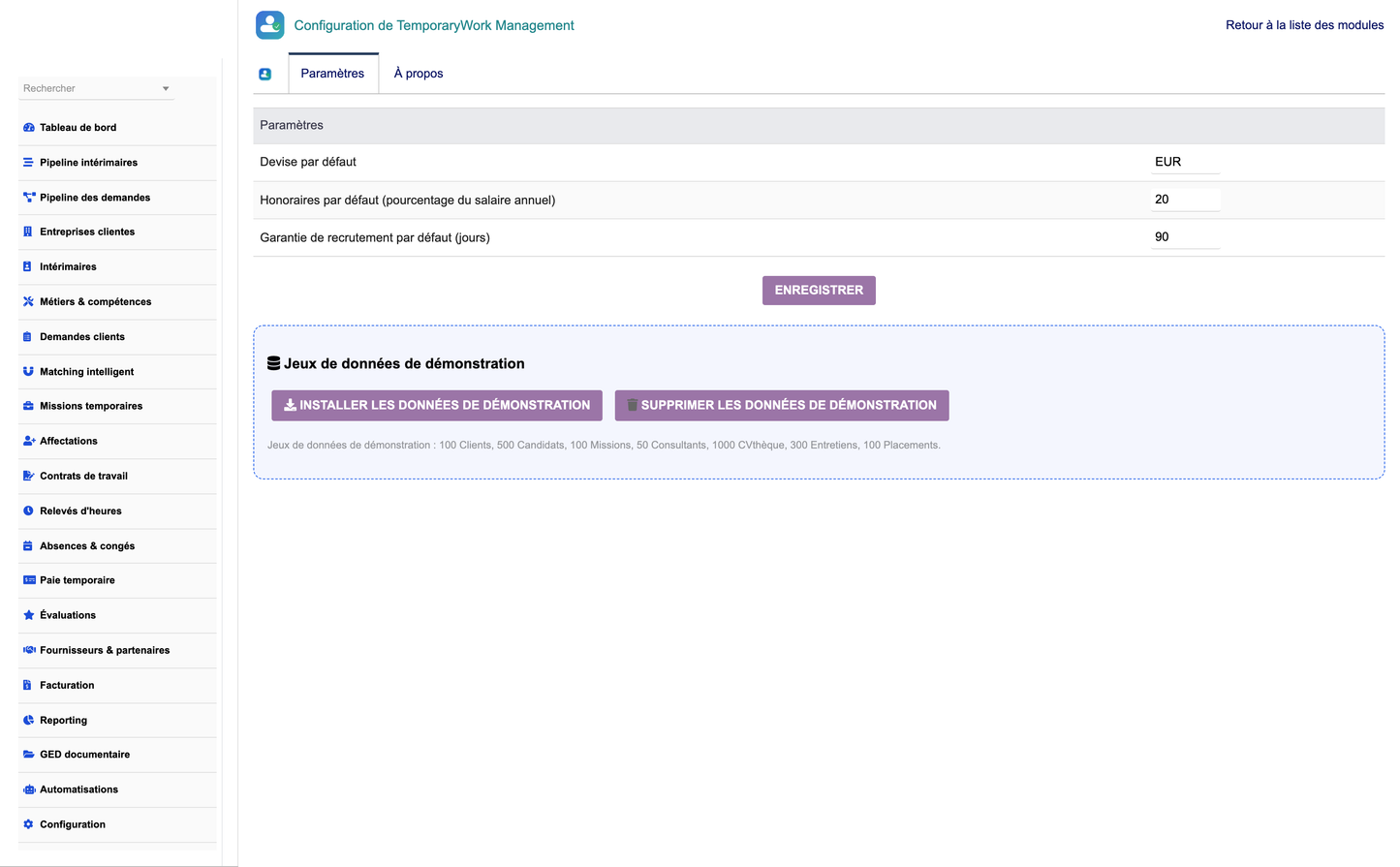
The configuration page centralises module setup and offers a one-click demonstration dataset so teams can explore the full solution immediately.
· Module options and behaviour settings.
· One-click load of a realistic demonstration dataset.
· One-click removal of the demonstration data.
· Access to permissions and the daily automation engine.
The module is structured around 16 dedicated business objects:
· Client companies — client hub with sectors, commercial terms and counters.
· Jobs — trade / skill repository with indicative rates and certifications.
· Temp workers — candidates and interim workers with full profiles.
· Worker skills — structured skills with level, experience and certification.
· Worker documents — per-worker document library with expiry tracking.
· Client requests — staffing demands with positions, dates and skills.
· Temporary missions — operational core linking client, request and worker.
· Assignments — worker assignment and replacement management.
· Work contracts — temporary-work contracts with motive and renewal.
· Timesheets — captured hours per mission and period.
· Timesheet lines — daily detail feeding each timesheet.
· Absences — leave and absence requests with validation.
· Temporary payroll — gross-to-net pay and employer cost.
· Evaluations — client and agency feedback and scoring.
· Suppliers & partners — recruitment firms, trainers, occupational medicine.
· Matchings — stored worker-to-request scoring results.
TemporaryWork Management is a first-class Dolibarr module that reuses the native ERP foundations rather than duplicating them:
· Third parties and contacts — clients and partners are native Dolibarr companies.
· Agenda — events and reminders for missions and follow-ups.
· Projects — optional project linkage for structured engagements.
· Quotes, orders and invoices — native commercial and billing documents.
· Payments — native Dolibarr payment tracking and accounting.
· Document management system (DMS) — native storage for all attachments.
The interface is fully translated and ships in five languages: French, English, Spanish, Italian and German.
· Granular permissions per right group (client, worker, job, order, mission, assignment, contract, time, payroll, reporting, admin) with read / write / delete rights.
· CSRF protection on all forms and actions, following Dolibarr security standards.
· Multi-entity aware: every object carries an entity for multi-company installations.
· Standard Dolibarr access control (accessforbidden) enforced on every page.
A daily automation engine keeps the workspace consistent without manual effort:
· Refresh of client aggregate counters (missions, workers, revenue).
· Automatic closing of missions that have reached their end date.
· Expiry alerts for contracts and worker documents.
A realistic French staffing-agency demonstration dataset can be loaded in one click and removed just as easily. It populates every object — clients, partners, jobs, workers across all pipeline stages, requests, missions, assignments, contracts, timesheets, absences, payroll, evaluations and matchings — with fully coherent relationships, so the whole solution can be explored immediately.
The following steps walk through a typical end-to-end workflow, from installing the module to billing a mission and analysing results.
1. Install and enable the module. Deploy the ZIP (or copy the folder into custom/) and enable TemporaryWork Management in Home → Setup → Modules.
2. Load the demonstration data. Open the module Configuration page and click “Load demonstration data” to populate a realistic dataset for exploration.
3. Create a client company. In Client companies, create a new client (linked to a native third party), set its sector and commercial terms.
4. Register a worker. In Temp workers, add a candidate or interim worker, complete the profile, skills, documents and availability.
5. Open a client request. In Client requests, record a new staffing demand with positions, dates, hours and required skills; track it on the request pipeline.
6. Run the matching engine. From the request, launch Smart matching to score and rank the best available workers on skills, experience, location, availability and salary.
7. Create a mission. Convert the accepted request into a temporary mission, assign the selected worker and set the hourly rate, cost and coefficient.
8. Capture timesheets. Record worked hours (normal, overtime, night, absence) per period and validate the timesheet.
9. Bill the client. From Billing, turn validated timesheets and missions into native Dolibarr invoices; register payments in Dolibarr.
10. Report and analyse. Use the Reporting suite and the dashboard to monitor workforce, revenue, margin and occupancy, and export to CSV / Excel / PDF.
· Dolibarr ERP/CRM 16.0 → 23.x (and later versions).
· PHP 7.1 or higher — fully PHP 8 compatible.
· The native Third-Parties (Societe) module must be enabled.
11. In Dolibarr, go to Home → Setup → Modules/Applications → Deploy/install external application.
12. Upload the TemporaryWork Management ZIP file and confirm the deployment.
13. Alternatively, copy the temporarywork folder into your Dolibarr custom/ directory.
14. Go to Home → Setup → Modules and enable TemporaryWork Management.
15. Open the module and, from the Configuration page, click “Load demonstration data” to explore it.
16. Review permissions per user / group in Home → Users & Groups.
TemporaryWork Management — © 2026 DoliResources — www.doliresources.com


