
Discover powerful Dolibarr extensions designed to automate your business processes
Transport TMS transforms Dolibarr into a complete Transport Management System (TMS). It brings the entire transport lifecycle — from the initial customer request through to...
Couldn't load pickup availability


Transport TMS transforms Dolibarr into a complete Transport Management System (TMS). It brings the entire transport lifecycle — from the initial customer request through to cash collection — into a single, coherent interface. Rather than juggling spreadsheets, e-mails and disconnected tools, carriers and transport departments manage requests, pricing, planning, field execution, invoicing and payment collection natively within their Dolibarr ERP/CRM.
The module is published by DoliResources (www.doliresources.com) and is delivered as version 1.0.0. All monetary values are displayed in Euros (EUR). It is fully multilingual and ships with five interface languages: French, English, Spanish, Italian and German.
Transport TMS reuses the standard Dolibarr foundations instead of duplicating them, ensuring consistent data across the whole information system:
· Third Parties — customers and their contacts are the native Dolibarr third parties, reused across requests, quotations, orders, missions, invoices and payments.
· Users — drivers and operators can be linked to Dolibarr user accounts for authentication, ownership and traceability.
· Agenda — operational events, deadlines and mission milestones surface through the native Dolibarr agenda.
· A single source of truth spanning the commercial, operational and financial dimensions of transport.
· A structured, repeatable business flow that reduces manual re-keying and lost information.
· Real-time visibility on fleet availability, mission progress, outstanding receivables and alerts.
· Decision-oriented dashboards and reports built on the operational data captured day to day.
The core business flow of Transport TMS follows four phases — Quote, Plan, Execute and Collect (in French: Coter, Planifier, Exécuter, Encaisser). Each phase hands structured data to the next, so information entered once is reused throughout the chain.
|
Phase |
Objects involved |
Purpose |
|
1. Quote |
Transport request → Tariff grid / Quotation (+ lines) |
Capture the customer need, price it against the tariff grid and issue a quotation. |
|
2. Plan |
Order → Mission (truck + driver assignment) |
Convert accepted quotations into orders and build missions by assigning a vehicle and a driver. |
|
3. Execute |
Road sheet, delivery proof, fuel voucher, driver bonus, mission expenses |
Run the operation in the field and record all supporting documents and costs. |
|
4. Collect |
Invoice → Payment |
Invoice the completed transport and record the collection of funds. |
Throughout the four phases, documents (delivery notes, CMR consignment notes, certificates, photos, contracts) and alerts (delays, unpaid invoices, missing proofs, expiring quotations) are managed continuously, giving operators a live picture of what needs attention.
Customer request → Quotation → Order → Mission → Field execution → Invoice → Payment
Transport TMS is organised into seventeen business objects, each covering a well-defined step of the transport chain. The subsections below describe the purpose, key fields and lifecycle statuses of every object.
The entry point of the chain. Transport requests capture the raw need expressed by a customer before any commercial commitment: where the goods must go, what they are and when they are expected.
Key fields: route (departure city and arrival city), goods description, cargo type, quantity (kg), volume (m³), requested date.
Statuses: submitted, processing, quoted, declined, converted.
A configurable catalogue of pricing rules that standardises how transport is priced. Rules can be defined by goods, route, customer, vehicle type and season, so the same commercial policy applies consistently across all quotations.
Key fields: goods, route, customer, vehicle type, season, unit basis (flat rate / per km / per tonne / per pallet), validity start and end dates.
Statuses: active, under review, expired.
An automatic calculator that derives a transport price from the tariff rules. It exposes a transparent factor breakdown so operators understand exactly how a price is built and which reference tariff was matched.
Key fields: base rate, distance, fuel, tolls, cargo surcharge, season, margin, matching reference tariff.
Statuses: computed on demand — the engine produces a priced result rather than holding its own lifecycle.
Formal commercial proposals sent to the customer. Quotations aggregate one or more service lines, apply VAT and expose amounts excluding and including tax, together with a validity date. The conversion rate feeds the commercial funnel.
Key fields: customer, lines, VAT, amount excl. tax, amount incl. tax, validity date, conversion rate.
Statuses: draft, sent, accepted, declined, expired.
The detailed content of a quotation. A typical quotation combines a transport service line with a fuel surcharge and tolls, each priced independently so the customer sees a clear cost decomposition.
Key fields: line type (transport service / fuel surcharge / tolls), quantity, unit, unit price, amount.
Statuses: follow the parent quotation.
Confirmed commitments created by converting accepted quotations into transport orders. Orders drive the operational planning and later the invoicing.
Key fields: customer, source quotation, order date, amounts, planning references.
Statuses: draft, confirmed, planned, in progress, delivered, invoiced, cancelled.
The central operational object of the module. A mission represents a concrete transport job to be carried out, tying together the order, the customer, the assigned resources and the physical journey, with a performance indicator to measure execution quality.
Key fields: order link, customer, vehicle, driver, route, goods, weight, volume, distance, departure datetime, arrival datetime, performance %.
Statuses: planned, loading, in transit, delivering, completed, cancelled.
A weekly dispatch board for assigning fleet resources. Rows represent vehicles and columns represent days, making it easy to assign a truck and a driver to each mission and to spot availability gaps at a glance.
Key fields: vehicles (rows), days (columns), assigned truck, assigned driver, availability.
Statuses: reflects the underlying mission statuses.
The fleet register. Each vehicle records its technical capabilities and its current operational state so the planning board and missions always work with accurate capacity information.
Key fields: type (semi-trailer, rigid truck, van, road tractor, tipper, tanker, refrigerated, flatbed), brand/model, payload (kg), load volume (m³), energy (diesel / CNG / electric / hybrid), year, base/depot, driver.
Statuses: available, on mission, in maintenance, unavailable.
The driver register, including regulatory qualifications. Drivers can be linked to Dolibarr user accounts and carry the licence and certification details needed to staff missions compliantly.
Key fields: employee id, name, phone, email, licence category (B/C/CE/D), licence number, ADR certification, hire date, linked Dolibarr user.
Statuses: available, on mission, resting, unavailable.
The operational mission order handed to the driver. It consolidates the shipper, consignee and instructions for the journey and serves as the on-the-road reference document.
Key fields: mission link, vehicle, driver, shipper, consignee, issue date, instructions.
Statuses: issued, signed, closed.
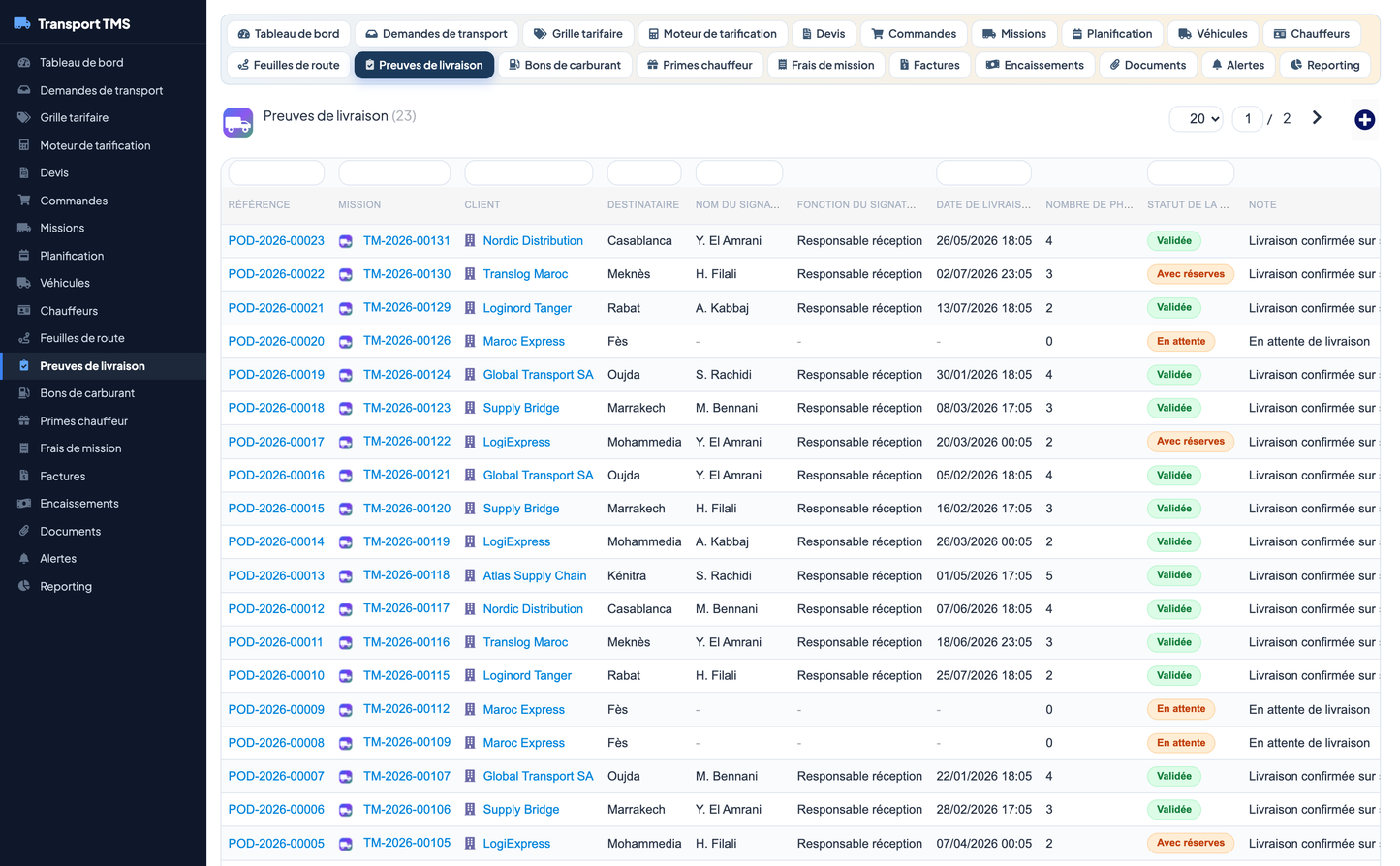
Proof-of-delivery records that close the loop on execution. They capture who signed for the goods, when, and any reservations raised at delivery, with support for attached photos.
Key fields: mission link, customer link, consignee, signatory name and role, delivery datetime, number of photos.
Statuses: pending, validated, with reservations, refused.
Records of fuel purchased during a mission, feeding operating-cost analysis and fleet consumption tracking.
Key fields: mission link, vehicle, station, date, litres, amount.
Statuses: recorded against the mission.
The variable compensation attached to a mission, combining a base amount with performance and safety bonuses to reward good execution.
Key fields: mission link, driver, base amount, performance bonus, safety bonus, total.
Statuses: calculated, approved, paid.
Miscellaneous operating costs incurred during a mission, tracked individually so they can be validated and reimbursed.
Key fields: type (toll, parking, meal, accommodation, other), label, date, amount.
Statuses: to validate, validated, reimbursed.
Customer invoices generated from completed transport. Invoices link back to the order and mission and carry full financial detail for collection follow-up.
Key fields: customer, order link, mission link, invoice date, due date, amount excl. tax, amount incl. tax, VAT, payment method, payment date.
Statuses: draft, sent, awaiting payment, overdue, paid, cancelled.
The record of funds collected against invoices, closing the Collect phase of the workflow.
Key fields: invoice link, customer link, payment date, amount, method, reference.
Statuses: recorded against the invoice.
A centralised document store attached to missions, so every piece of supporting paperwork is filed against the operation it belongs to.
Key fields: mission link, type (delivery note, invoice, CMR consignment note, conformity certificate, photo, contract, other), file name, file size, date, archived flag.
A proactive notification layer that surfaces situations requiring attention across the whole chain, prioritised by severity so operators tackle the most critical items first.
Key fields: type (delivery delay, unpaid invoice, missing POD, expired quotation, missing document, payment due), message, severity (info / warning / critical).
Statuses: open, handled, ignored.
Transport TMS opens on a modern dashboard that summarises the health of the business at a glance. It is organised into four functional zones, each combining headline indicators with visual charts.
· Open requests, pending quotations, accepted quotes, conversion rate and active orders.
· A quotation funnel visualising the commercial pipeline.
· A missions-by-status donut chart.
· Missions this month, missions in progress and available vehicles.
· An on-time delivery gauge and a mission performance gauge.
· Average distance per mission.
· Invoiced revenue for the month and for the year, outstanding receivables, overdue invoices and amount collected this month.
· A revenue-versus-cost donut chart.
· A 12-month revenue chart and a top-customers view.
· Open alerts and pending proofs counters.
· A recent-alerts table highlighting items to handle.
Beyond day-to-day operations, Transport TMS provides a decision-analytics section that turns operational data into management insight. The following reports are available:
|
Report |
What it shows |
|
12-month revenue evolution |
Monthly revenue trend over the trailing year. |
|
Revenue vs cost |
Comparison of revenue against operating cost. |
|
Revenue by customer (top 10) |
Ranking of the ten largest customers by revenue. |
|
Most profitable routes |
Routes ordered by profitability. |
|
Missions by status |
Distribution of missions across their lifecycle statuses. |
|
Missions by cargo type |
Breakdown of missions by type of goods carried. |
|
Fleet by vehicle type |
Composition of the fleet by vehicle category. |
|
Invoices by status |
Distribution of invoices across billing statuses. |
|
Operating cost structure |
Decomposition of operating costs by nature. |
|
Fleet by base |
Distribution of vehicles across depots/bases. |
|
Driver bonuses over 12 months |
Trend of driver bonuses over the trailing year. |
Access to Transport TMS is governed by a granular permission model aligned with the functional structure of the module. Seven permission groups each expose read, write and delete rights, so responsibilities can be distributed precisely across commercial, operational and financial roles. A dedicated module administration right controls configuration.
|
Permission group |
Scope |
Rights |
|
Commercial |
Transport requests, tariff grid, quotations |
Read / Write / Delete |
|
Orders |
Transport orders |
Read / Write / Delete |
|
Operations |
Missions, vehicles, drivers, road sheets |
Read / Write / Delete |
|
Execution |
Delivery proofs, fuel vouchers, driver bonuses, mission expenses |
Read / Write / Delete |
|
Invoicing |
Invoices, payments |
Read / Write / Delete |
|
Documents |
Documents, alerts |
Read / Write / Delete |
|
Reporting |
Reports and analytics |
Read / Write / Delete |
|
Administration |
Module configuration and demo data |
Administration right |
A dedicated setup page centralises the module defaults so day-to-day entry is faster and consistent:
· Default VAT rate — applied automatically to new quotations and invoices.
· Default payment terms (days) — used to compute invoice due dates.
· Default quotation validity (days) — used to set the validity date of new quotations.
To help teams evaluate and learn the module quickly, Transport TMS ships with a realistic demonstration dataset built around Moroccan carriers and expressed in Euros. With one click, the module seeds a complete set of coherent records spanning the full flow — from requests and quotations through missions, execution documents and invoices to payments. A matching one-click removal cleans the demonstration data away again, leaving the module ready for production use.
Transport TMS is a native Dolibarr module built on the standard framework conventions:
|
Attribute |
Value |
|
Business objects |
17 business objects covering the full transport chain. |
|
Module technical name |
transporttms |
|
Database table prefix |
llx_ttms_ |
|
Framework |
Built on the Dolibarr CommonObject base class. |
|
Compatibility |
Dolibarr 16 and later / PHP 7.1 and later. |
|
Publisher |
DoliResources (www.doliresources.com). |
|
Licence |
GPL v3 or later. |
|
Currency |
EUR. |
|
Interface languages |
French, English, Spanish, Italian, German. |
Because it follows the native Dolibarr object model and table-prefix conventions, Transport TMS integrates cleanly with the rest of a Dolibarr installation and benefits from the platform's standard list, card, permission and multilingual mechanisms.
Transport TMS 1.0.0 — Functional Description


