
Discover powerful Dolibarr extensions designed to automate your business processes
Travel Agency Management is a commercial Dolibarr ERP module published by DoliResources that transforms a standard Dolibarr installation into a complete, vertical...
Couldn't load pickup availability


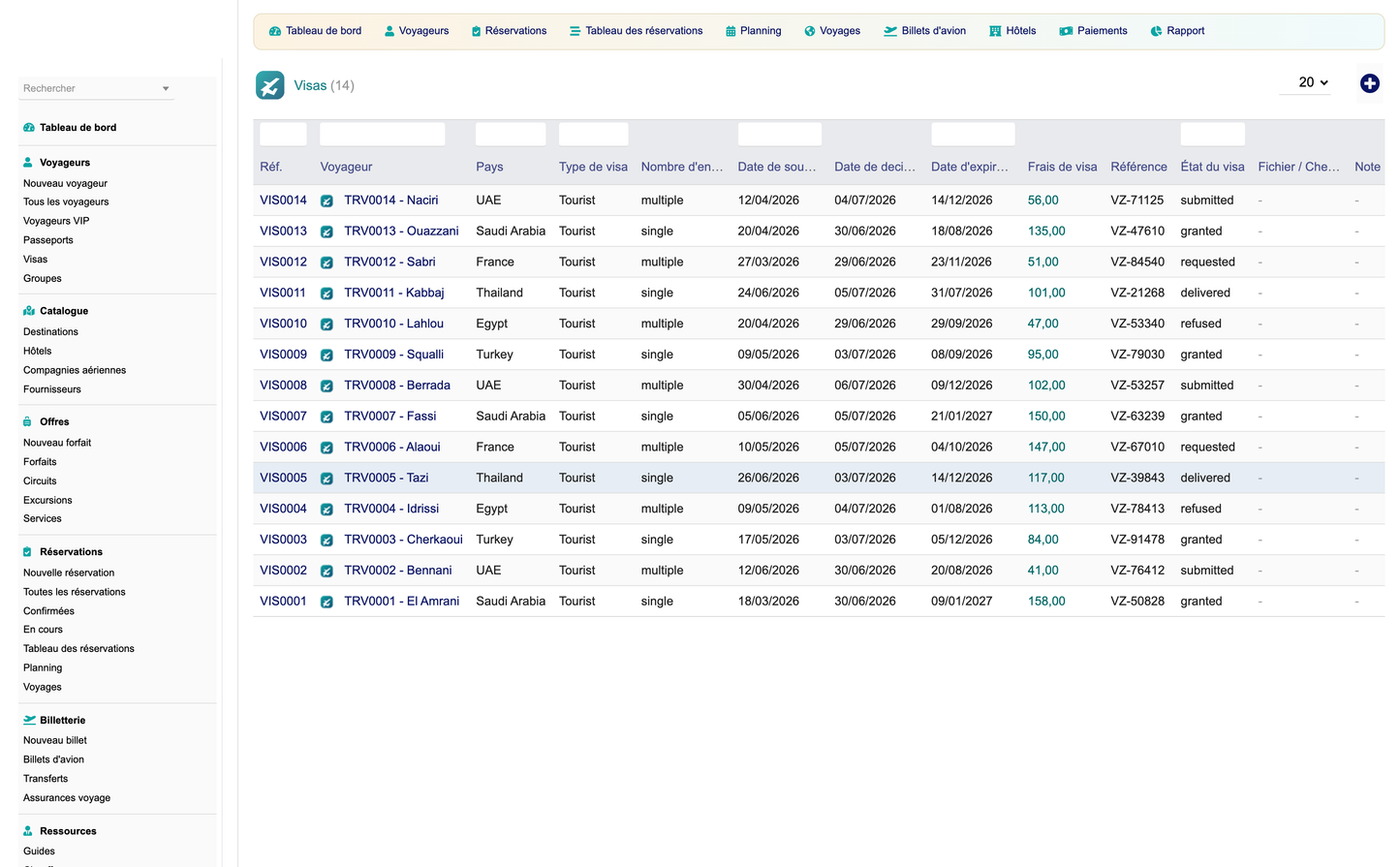
Travel Agency Management is a commercial Dolibarr ERP module published by DoliResources that transforms a standard Dolibarr installation into a complete, vertical information system for the travel industry. It equips travel agencies, tour operators, ticketing agencies, incoming and DMC (Destination Management Company) agencies, business-travel desks and religious-travel (Hajj & Omra) organisers with a single tool covering their commercial, operational, financial, logistics and administrative needs — removing the need for a second, dedicated back-office application.
The module is built on the official Dolibarr MVC framework and a generic, key-driven object engine derived from the core CommonObject class. It ships 28 business objects, each with dedicated list and card views, an executive dashboard, a drag-and-drop booking pipeline, a departures/returns planning calendar, a reporting hub of 16 exportable reports, and a daily alert engine. Rather than duplicating Dolibarr functionality, it enriches native features — third parties, contacts, quotes, orders, invoices, payments, bank, products/services, projects, accounting, agenda and the electronic document management system (ECM/GED) — so that agencies benefit from the full accounting and CRM strength of Dolibarr while gaining travel-specific workflows on top.
Key differentiators include a booking lifecycle managed on a visual Kanban board, native handling of Hajj & Omra group departures, integrated air-ticket (PNR) management, supplier and agent commission tracking, and a proactive notification engine that watches passport and visa expiries, departures, returns and outstanding balances. The module is multi-entity aware, XSS/CSRF-safe, extrafields-compatible, REST-API-ready and available in five languages (French, English, Spanish, Italian and German).
At a glance
|
Attribute |
Value |
|
Module name |
Travel Agency Management |
|
Editor |
DoliResources (https://www.doliresources.com) |
|
Version / License |
1.0 / GPL v3+ |
|
Compatibility |
Dolibarr v16 – v23+, PHP 8.x |
|
Module id (numero) |
510200 |
|
Languages |
French, English, Spanish, Italian, German |
|
Business objects |
28 (list + card, generic engine) |
|
Reports |
16 (CSV / Excel / PDF / print) |
|
Permission groups |
7 + module administration |
Travel businesses juggle a wide range of activities: selling packaged tours and tailor-made trips, issuing air tickets, booking hotels and transfers, organising group departures, managing guides and vehicles, collecting deposits and balances, paying suppliers and tracking commissions. Off-the-shelf accounting software rarely covers the operational side, while dedicated reservation systems seldom integrate cleanly with accounting. Travel Agency Management closes that gap by delivering the operational layer directly inside Dolibarr's proven ERP/CRM core.
|
Agency type |
Primary needs addressed |
|
Retail travel agency |
Selling packages/circuits, quotes and invoices, deposits, air tickets, customer follow-up. |
|
Tour operator |
Designing circuits and packages, organising scheduled departures (trips), managing suppliers and margins. |
|
Ticketing agency |
Issuing air tickets (PNR, cabin class, baggage, fares), agency fees, airline reporting. |
|
Incoming / DMC agency |
Local logistics: hotels, guides, drivers, vehicles, transfers, excursions for inbound groups. |
|
Business-travel desk |
Corporate travellers, fast quote-to-invoice, receivables control, ticketing and transfers. |
|
Hajj & Omra organiser |
Religious-travel group departures, passports and visas, group management, deposits and balances. |
· Consolidation — a single ERP instead of a fragmented tool stack, with accounting and operations under one roof;
· Visibility — a booking pipeline, planning calendar and alert engine that keep the whole team on the same page;
· Efficiency — automatic quote, invoice, payment and commission flows reduce manual re-keying;
· Compliance & safety — passport, visa, departure, return and balance-due alerts prevent operational failures;
· Scalability — built on Dolibarr, it grows with the agency and integrates with the wider ecosystem.
The module organises 28 business objects across seven functional domains. Every object provides a standardised list view (search, filter, sort, paginate, export) and a card view (detail cockpit with tabs, linked documents, notes and history), all rendered by the same generic engine for a consistent user experience.
|
Domain |
Business objects |
|
Clients & travellers |
Traveler, Passport, Visa, Group |
|
Catalog & suppliers |
Destination, Supplier, Hotel, Airline |
|
Offers |
Circuit, Package, Excursion, Service |
|
Bookings |
Booking, Booking line, Trip |
|
Ticketing & mobility |
Air Ticket, Transfer, Travel Insurance |
|
Resources |
Guide, Driver, Vehicle |
|
Finance & partners |
Payment, Commission, Partner |
|
Marketing & documents |
Marketing Campaign, Document |
|
Automation |
Alert, Automation rule |
Total: 28 objects. Each is a first-class Dolibarr object with permissions, extrafields, notes, linked files and full audit metadata.
Each domain below is described by its purpose, key data fields, typical workflows and integration with native Dolibarr features.
Purpose:
Manage the people who travel and the identity documents required for their trips. A Traveler is linked to a native Dolibarr third party (client or prospect), enabling reuse of contact, address, accounting and CRM data.
Key data fields:
· Traveler: title, first/last name, date of birth, nationality, gender, email/phone, linked third party, loyalty status/points, preferences, notes.
· Passport: number, holder (traveler), issuing country, issue date, expiry date, place of issue, scanned copy (GED).
· Visa: type, destination country, number, issue/expiry dates, status, linked traveler and trip, attached document.
· Group: name, group leader, members (travelers), size, associated trip and bookings (used for Hajj/Omra and tour groups).
Workflows:
· create a traveller from scratch or promote an existing third party; capture passport and visa records with expiry dates;
· expiry dates feed the alert engine (passport/visa expiring soon);
· assemble travellers into a group for collective booking and departure management.
Native integration:
Third parties & contacts (client/prospect link), ECM/GED (document scans), agenda (follow-up events), CRM (loyalty and preferences).
Purpose:
Maintain the reference data used to build offers and operate trips: where the agency sells, and who provides the services.
Key data fields:
· Destination: name, country, region, city, description, seasonality, popularity, image.
· Supplier: linked native supplier third party, service categories, contact, contract terms, default commission.
· Hotel: name, destination, category/stars, address, room types, board basis, supplier link, contact.
· Airline: name, IATA code, alliance, contact, default baggage policy, supplier link.
Workflows:
· register destinations, then attach hotels and airlines; link each to a native supplier for purchasing and payments;
· catalog data becomes selectable when building packages, circuits, bookings and air tickets.
Native integration:
Suppliers (vendor third parties), products/services (purchasable services), accounting (purchase side).
Purpose:
Define the sellable products of the agency, from full multi-day circuits to single add-on services.
Key data fields:
· Circuit: itinerary (day-by-day), destinations, duration, included/excluded services, hotels, base price, images.
· Package: bundled offer (flight + hotel + transfers/excursions), destination, duration, board, price, margin.
· Excursion: name, destination, duration, capacity, price, guide requirement, description.
· Service: catalogue entry (e.g. insurance, visa assistance, upgrades), linked native product/service, price, VAT.
Workflows:
· build a circuit or package from destinations, hotels, airlines and services; set base price and target margin;
· offers are selected on a booking and expanded into booking lines; excursions can be added per booking.
Native integration:
Products/services (catalogue and pricing), projects (per departure), accounting (revenue mapping).
Purpose:
The operational heart of the module: the reservation engine that turns an enquiry into a confirmed, paid and completed trip.
Key data fields:
· Booking: reference, client (traveler/third party), trip, dates, pax count, status stage, total amount, deposit, balance, margin, sales agent.
· Booking line: product/offer, description, quantity, unit price, VAT, discount, supplier, cost, margin.
· Trip: organised departure (Hajj/Omra, business, group, individual, cruise), type, destination, departure/return dates, capacity, seats sold, guide/vehicle assignment.
Booking lifecycle (Kanban):
Draft → Quoted → Confirmed → Deposit → Paid → Ongoing → Completed (won), with a Cancelled (lost) branch. The pipeline board supports drag & drop, changing a booking's stage through an AJAX call without leaving the page.
Workflows:
· create a booking, attach a trip and offers, add lines; issue a native quote; on acceptance confirm and take a deposit;
· collect the balance, mark the trip ongoing on departure and completed on return; cancel with reason where needed.
Native integration:
Quotes/propal, orders, invoices/facture, payments, projects, agenda (departure/return events).
Purpose:
Handle the transport and protection components attached to bookings.
Key data fields:
· Air Ticket: PNR/record locator, airline, passenger (traveler), route/segments, cabin class, baggage allowance, fare, taxes, agency fee, issue date, ticket number, linked booking.
· Transfer: type (airport/hotel/inter-city), vehicle, driver, pickup/drop-off, date/time, pax, price, linked booking.
· Travel Insurance: policy, provider, coverage, insured travellers, dates, premium, linked booking.
Workflows:
· issue an air ticket against a booking with fare and agency fee; schedule transfers and assign vehicle/driver;
· attach an insurance policy; all three roll up into the booking total and reporting.
Native integration:
Products/services, invoices, suppliers (airlines/providers), agenda (transfer scheduling).
Purpose:
Manage the human and material resources used to deliver trips, transfers and excursions.
Key data fields:
· Guide: name, languages, specialities, destinations, availability, rate, contact, linked trips/excursions.
· Driver: name, licence, languages, availability, contact, linked transfers/vehicles.
· Vehicle (fleet): registration, type, capacity, ownership/supplier, status, linked transfers.
Workflows:
· register resources; assign a guide to a trip/excursion and a driver+vehicle to a transfer; check availability;
· assignments appear on the planning calendar and in operations reports.
Native integration:
Agenda (availability/assignments), suppliers (subcontracted guides/vehicles), projects.
Purpose:
Track money in and money out, including deposits, balances and the commissions the agency earns or owes.
Key data fields:
· Payment: amount, date, method, type (deposit/balance/refund), linked booking/invoice, bank account.
· Commission: beneficiary type (supplier/agent/partner), base amount, rate, computed amount, status, linked booking/trip.
Workflows:
· record deposits and balance payments against bookings and native invoices; reconcile to bank;
· compute commissions from booking margin/amount using configured or supplier/agent rates; track receivables.
Native integration:
Invoices/facture, payments, bank, accounting (revenue/margin), third parties (agents/partners).
Purpose:
Support demand generation and partner relationships.
Key data fields:
· Marketing Campaign: name, channel, target segment, period, budget, offers promoted, results.
· Partner: business partner (agency/affiliate/reseller), contact, commission terms, linked bookings.
Workflows:
· plan a campaign around specific packages or destinations; attribute bookings and commissions to partners.
Native integration:
Emailing/mass e-mail, third parties (partners), CRM, ECM/GED.
Purpose:
Centralise all travel-related documents — passports, visas, vouchers, contracts, e-tickets, insurance certificates — within Dolibarr's electronic document management system.
Key data fields:
· Document: title, type/category, linked object (traveler, booking, trip, air ticket), file, upload date, owner.
Workflows / integration:
Files are stored and versioned through ECM/GED and are directly accessible from each object's card view; generated documents (quotes, invoices, vouchers) are attached automatically.
Purpose:
Keep operations proactive with a rules-driven notification engine.
Key data fields:
· Alert: type (passport expiry, visa expiry, departure reminder, return reminder, balance-due), target object, due date, severity, status.
· Automation rule: trigger condition, lead-time, action (raise alert / internal notification / e-mail/SMS-ready), enabled flag.
Workflows:
· a daily cron (and an on-demand run) evaluates rules and raises operational alerts; users receive internal notifications;
· e-mail and SMS channels are supported for outbound reminders where configured.
Native integration:
Scheduled jobs/cron, agenda, notifications, emailing.
1. A traveller enquiry is captured as a Booking in Draft, linked to a trip and offers.
2. Booking lines are added (package/circuit, air ticket, transfers, excursions, insurance, services).
3. A native Dolibarr quote (propal) is generated; the booking moves to Quoted.
4. On client acceptance the booking is Confirmed and, if applicable, a deposit is requested.
5. A deposit invoice/payment is recorded (Deposit stage), then the balance invoice is issued.
6. Full payment moves the booking to Paid; accounting entries follow through native invoicing.
7. Draft — initial capture, editable, no commitment.
8. Quoted — quote sent, awaiting client decision.
9. Confirmed — client agreed; seats/resources reserved.
10. Deposit — deposit received; balance outstanding.
11. Paid — balance settled; trip fully funded.
12. Ongoing — travellers have departed; trip in progress.
13. Completed — returned; booking won and closed. (Cancelled — lost branch with reason.)
Stages are managed visually on the Kanban board with drag & drop (AJAX state change).
14. Create a Group and enrol travellers, capturing each passport and visa.
15. Attach the group to a religious-travel Trip (departure/return dates, capacity, guide).
16. Generate individual or collective bookings for group members with shared pricing.
17. Collect deposits per member; monitor passport/visa expiries via alerts before departure.
18. Assign guide and transfers; mark the trip ongoing on departure and completed on return.
19. Open the booking and add an Air Ticket with airline, route, cabin class and baggage.
20. Enter fare, taxes and the agency fee; record the PNR and ticket number on issue.
21. Schedule any transfers (vehicle + driver) and attach an insurance policy if required.
22. Amounts roll up into the booking total and feed air-ticket and airline reporting.
23. Determine the commission base (booking margin or amount) per line or per booking.
24. Apply the applicable rate: supplier default, agent rate, partner terms or the configured agency %.
25. Compute and record the Commission with beneficiary type and status (due/paid).
26. Commissions appear in the commission report and finance dashboard zone.
27. A daily cron job evaluates automation rules against passports, visas, trips and balances.
28. Records inside the configured lead-time raise an Alert of the relevant type.
29. Users receive internal notifications; e-mail/SMS reminders are sent where enabled.
30. Alerts are listed on the dashboard (open alerts) and cleared when resolved.
The module adds a dedicated left-menu tree with twelve groups. Below each group are its screens.
|
Menu group |
Screens |
|
Dashboard |
Executive dashboard (KPIs, pipeline preview, charts, finance & operations zones). |
|
Clients |
Travelers, Passports, Visas, Groups. |
|
Catalog |
Destinations, Hotels, Airlines, Suppliers. |
|
Offers |
Packages, Circuits, Excursions, Services. |
|
Bookings |
Bookings, Booking board / pipeline, Planning, Trips. |
|
Ticketing |
Air tickets, Transfers, Insurance. |
|
Resources |
Guides, Drivers, Vehicles. |
|
Finance |
Payments, Commissions, Invoicing, Quotes, Invoices. |
|
Marketing |
Campaigns, Partners, Documents. |
|
Automation |
Alerts, Automation rules. |
|
Reporting |
Reporting hub (16 reports). |
|
Setup |
Module configuration and demo data. |
· Dashboard — summary cockpit with KPI tiles, a live booking-pipeline preview, revenue and destination charts, and finance/operations/alert zones.
· Booking pipeline — Kanban board of bookings across the seven lifecycle stages plus Cancelled, with drag-and-drop AJAX stage changes.
· Planning — monthly calendar of departures and returns, colour-coded per-day events, with month navigation.
· List views — standardised list (search, filter, sort, mass-action, export) for every object.
· Card cockpits — detail cockpit per object with tabs, linked objects, financial totals, notes, documents and audit history.
· Reporting hub — central hub linking to the 16 reports with export controls.
The executive dashboard uses an ocean-blue / turquoise / sand / sunset colour charter and is organised into functional zones.
· Today — departures today, returns today, bookings today, ongoing trips, open alerts.
· Sales activity — bookings/month, revenue/month, margin/month, pax/month, conversion rate, active clients.
· Booking pipeline — a live preview of bookings across the lifecycle stages.
· Charts — revenue by month (bars) and bookings by destination (pie).
· Finance — revenue YTD, margin YTD, payments received, deposits, receivables, commissions.
· Operations & alerts — tickets/month, upcoming departures, passports expiring, visas expiring.
|
KPI |
Description |
|
Bookings today |
Number of bookings created today. |
|
Revenue |
Sales turnover over the selected period. |
|
Profit / margin |
Gross margin (revenue minus supplier cost). |
|
Quotes |
Quotes issued / outstanding. |
|
Invoices |
Invoices issued in the period. |
|
Ongoing trips |
Trips currently in progress. |
|
Departures today |
Trips departing today. |
|
Returns today |
Trips returning today. |
|
Active clients |
Travellers/clients with recent activity. |
|
Conversion rate |
Share of quotes converted to confirmed bookings. |
|
Tickets sold |
Air tickets issued in the period. |
|
Hotels booked |
Hotel reservations in the period. |
|
Commissions |
Commissions earned/owed. |
|
Payments received |
Cash collected in the period. |
|
Receivables |
Outstanding balances due from clients. |
|
Popular destinations |
Top destinations by bookings/revenue. |
|
Top sellers |
Best-performing sales agents. |
|
Passport / visa expiries |
Documents expiring within the lead-time. |
The reporting hub gathers 16 reports, each filterable by period and exportable to CSV, Excel and PDF, with a print view.
|
# |
Report |
Content / columns |
|
1 |
Sales (monthly) |
Revenue, bookings and margin per month. |
|
2 |
Bookings by state |
Count and value of bookings per lifecycle stage. |
|
3 |
Destinations |
Bookings, pax and revenue per destination. |
|
4 |
Clients |
Activity, spend and outstanding balance per client. |
|
5 |
Trips (by type) |
Trips grouped by type (Hajj/Omra, business, group, individual, cruise). |
|
6 |
Hotels |
Hotel bookings, nights and cost per hotel. |
|
7 |
Air tickets (by airline) |
Tickets, fares and agency fees per airline. |
|
8 |
Excursions |
Excursion sales, pax and margin. |
|
9 |
Guides |
Guide assignments and utilisation. |
|
10 |
Vehicles |
Vehicle/transfer usage and cost. |
|
11 |
Commissions |
Commissions by beneficiary and status. |
|
12 |
Payments |
Payments received by method and period. |
|
13 |
Receivables |
Outstanding balances and ageing. |
|
14 |
Profitability |
Revenue, cost and margin by offer/trip/period. |
|
15 |
Suppliers |
Purchases and commissions per supplier. |
|
16 |
VAT |
VAT collected by rate for the period. |
Export formats: CSV, Excel, PDF and print — available on every report.
Travel Agency Management enriches rather than replaces native Dolibarr features. The table below maps each native module to its role.
|
Native module |
How it is used |
|
Third parties & contacts |
Travellers, suppliers, partners and agents are backed by native third parties and contacts. |
|
Quotes (propal) |
Booking quotes are issued as native proposals. |
|
Orders |
Confirmed bookings can generate native orders where required. |
|
Invoices (facture) |
Deposit and balance invoicing use native invoices. |
|
Payments & bank |
Deposits, balances and refunds are recorded and reconciled to bank accounts. |
|
Products & services |
Offers, tickets and services map to native products/services and pricing. |
|
Projects |
Trips and departures can be tracked as projects. |
|
Accounting |
Revenue, margin, VAT and payments flow into native accounting. |
|
Agenda |
Departures, returns, transfers and assignments create agenda events. |
|
ECM / GED |
Passports, visas, vouchers and contracts are stored and versioned. |
|
Emailing |
Campaigns and reminders use native mass-email. |
|
Scheduled jobs (cron) |
The daily alert engine runs as a native cron task. |
Security follows Dolibarr's native permission model. The module defines seven permission groups — Catalog, Clients, Bookings, Finance, Resources, Marketing and Reporting — each with read, write and delete rights (read and write are granted by default), plus a module-administration permission. Access is enforced on every list, card and action.
· Read — view lists and cards within the group.
· Write — create and modify records within the group.
· Delete — remove records within the group.
· Admin — configure the module, manage demo data and defaults.
A full audit trail is provided by Dolibarr (creation and modification user plus timestamps on every record), and the module is multi-entity aware so permissions and data are isolated per entity.
R = read, W = write, D = delete, – = none. A tick in Admin denotes module administration.
|
Role |
Catalog |
Clients |
Bookings |
Finance |
Resources |
Marketing |
Reporting |
Admin |
|
Administrator |
RWD |
RWD |
RWD |
RWD |
RWD |
RWD |
RWD |
Yes |
|
Director |
RWD |
RWD |
RWD |
RWD |
RWD |
RWD |
RWD |
– |
|
Sales Manager |
RW |
RW |
RWD |
R |
R |
RW |
RW |
– |
|
Travel Agent |
R |
RW |
RW |
– |
R |
– |
R |
– |
|
Accountant |
R |
R |
R |
RWD |
– |
– |
RW |
– |
|
Ticketing Officer |
R |
R |
RW |
– |
R |
– |
R |
– |
|
Visa Officer |
R |
RW |
R |
– |
– |
– |
R |
– |
|
Groups Manager |
R |
RW |
RW |
– |
RW |
– |
R |
– |
|
Guide |
R |
– |
R |
– |
R |
– |
– |
– |
|
Driver |
– |
– |
R |
– |
R |
– |
– |
– |
|
Front Desk |
R |
RW |
RW |
– |
R |
– |
– |
– |
The matrix is a recommended baseline; each right can be tuned per user or group in Dolibarr's user administration.
The module is implemented on the official Dolibarr MVC architecture. All 28 objects extend the core CommonObject class through a generic, key-driven engine: a single set of controllers and templates renders every object's list and card view from field definitions, ensuring consistency and maintainability.
Business data is stored in dedicated tables prefixed llx_travelagency_* (for example llx_travelagency_booking, llx_travelagency_trip, llx_travelagency_air_ticket, llx_travelagency_passport, llx_travelagency_visa, llx_travelagency_commission). Foreign keys link to native tables (third parties, invoices, products, projects). A schema self-heal routine runs on upgrade, creating any missing tables, columns or indexes so installations stay consistent across versions.
· Hooks-ready — hook points allow other modules to extend behaviour without core edits.
· Triggers-ready — business events fire triggers for automation and integration.
· Extrafields — every object accepts custom extrafields.
· REST-API-ready — objects are exposed for the Dolibarr REST API.
The module is XSS- and CSRF-safe: all input is read through GETPOST with type filtering, and state-changing actions are protected by newToken/CSRF tokens. Access is checked against the permission model on every entry point. Data is isolated per entity in multi-entity installations, and a full audit trail records the creating/modifying user and timestamps.
List views use server-side pagination, filtering and sorting; frequently queried columns (status, dates, foreign keys, import key) are indexed. The Kanban board updates a single record via AJAX rather than reloading the page.
All user-facing text is externalised into language files — no hardcoded strings. Five languages ship out of the box: French, English, Spanish, Italian and German. Additional languages can be added by translating the provided .lang files.
A dedicated setup page exposes the module's operating parameters:
|
Parameter |
Purpose |
|
Default currency |
Currency applied to new offers and bookings. |
|
Default VAT |
VAT rate pre-filled on lines. |
|
Default deposit % |
Deposit percentage suggested at confirmation. |
|
Agency commission % |
Default rate used in commission calculation. |
|
Quote validity |
Default validity period for quotes. |
|
Alert lead-time |
Days ahead for passport/visa/departure/balance alerts. |
The setup page offers one-click Install demonstration data and Remove demonstration data actions. The dataset is versioned and every row is tagged with the import key TVMDEMO, so removal is a surgical purge that touches only demo records and never real data.
The demo dataset seeds:
· destinations, suppliers, hotels, airlines, guides, drivers, vehicles, services, circuits and packages;
· around 30 travellers (plus native third parties), passports, visas, groups and partners;
· trips and around 60 bookings with lines, air tickets, transfers and insurance;
· payments, commissions, documents, marketing campaigns and automation rules;
· native quotes and invoices to illustrate the finance flow.
A family of four requests an Omra package. The agent creates a Group, enrols the four travellers and records each passport and visa. A religious-travel Trip is attached, a booking is created with the Omra package and transfers, and a native quote is issued. On acceptance the booking is confirmed and a deposit collected. Passport/visa expiry alerts confirm all documents are valid; the balance is settled before departure, the trip is marked ongoing, and completed on return.
A corporate client needs a business trip for an executive. The business-travel desk creates a booking against a business-type trip, issues an air ticket (business class, PNR, agency fee) and schedules airport transfers. A native invoice is raised immediately for the corporate account; the receivable is tracked until payment, and the trip appears on the planning calendar.
A tour operator sells a 7-day Morocco circuit to a group of 20. A Group is created, the circuit and hotels are attached to a group Trip, a guide and vehicle are assigned, and excursions are added. Collective and individual bookings are generated, deposits collected, and the profitability report tracks margin against supplier costs.
A walk-in client wants a single flight. Front desk creates a booking, adds an air ticket with route, cabin class, baggage and fare plus the agency fee, records the PNR on issue and takes payment. The sale flows into the air-ticket and airline reports.
The accountant opens the Receivables report and the dashboard finance zone to review outstanding balances. Balance-due alerts flag bookings with amounts overdue; reminders are sent, payments recorded against the native invoices, and the receivables figure updates.
The daily alert cron detects a traveller whose passport expires within the configured lead-time before their upcoming departure. It raises a passport-expiry alert and notifies the visa officer, who contacts the traveller to renew the document before the trip — preventing a departure failure.
|
Area |
Specification |
|
Module |
Travel Agency Management — DoliResources — v1.0 — GPL v3+ |
|
Compatibility |
Dolibarr v16 – v23+, PHP 8.x, module id 510200 |
|
Business objects |
28 (list + card via generic engine) |
|
Booking lifecycle |
Draft → Quoted → Confirmed → Deposit → Paid → Ongoing → Completed; Cancelled |
|
Pipeline |
Drag-and-drop Kanban board (AJAX stage change) |
|
Menu groups |
12 (Dashboard … Setup) |
|
Dashboard |
KPI zones, pipeline preview, revenue bars + destination pie, finance & operations |
|
KPIs |
18+ including bookings, revenue, margin, conversion, receivables, expiries |
|
Reports |
16 with CSV / Excel / PDF / print export |
|
Planning |
Monthly departures & returns calendar |
|
Alerts |
Daily cron + on-demand: passport/visa/departure/return/balance |
|
Permissions |
7 groups (R/W/D) + admin; recommended 11 roles |
|
Native integration |
Third parties, quotes, orders, invoices, payments, bank, products, projects, accounting, agenda, ECM, emailing, cron |
|
Architecture |
Dolibarr MVC, CommonObject engine, hooks/triggers/extrafields/REST, XSS/CSRF-safe, multi-entity, schema self-heal |
|
Data model |
llx_travelagency_* tables with indexes |
|
Languages |
French, English, Spanish, Italian, German (no hardcoded text) |
|
Configuration |
Currency, VAT, deposit %, commission %, quote validity, alert lead-time |
|
Demo data |
One-click install/remove, versioned, purge by import key TVMDEMO |
|
Term |
Definition |
|
DMC |
Destination Management Company — a local incoming agency handling ground services. |
|
Hajj / Omra |
Islamic pilgrimages to Mecca; Omra can be performed year-round, Hajj at a fixed period. |
|
PNR |
Passenger Name Record — the reservation record locator for an air ticket. |
|
Cabin class |
Travel class of an air ticket (economy, premium, business, first). |
|
Kanban / pipeline |
Board showing bookings by lifecycle stage, movable by drag & drop. |
|
Trip |
An organised departure (Hajj/Omra, business, group, individual, cruise). |
|
Booking / booking line |
A reservation and its detailed cost/revenue lines. |
|
Transfer |
Ground transport (airport/hotel/inter-city) with vehicle and driver. |
|
Commission |
Amount earned or owed to a supplier, agent or partner on a sale. |
|
Receivables |
Client balances due but not yet paid. |
|
Extrafields |
Custom fields added to a Dolibarr object without coding. |
|
ECM / GED |
Dolibarr electronic document management system. |
|
Import key |
Tag applied to demo rows (TVMDEMO) enabling a surgical purge. |
|
Multi-entity |
Dolibarr feature isolating data across companies/branches. |
DoliResources (https://www.doliresources.com) is a publisher of professional, vertical Dolibarr modules. Its modules follow Dolibarr's official architecture and best practices, enriching the native ERP/CRM rather than duplicating it, and are delivered with multilingual interfaces, demonstration data and long-term compatibility across Dolibarr versions. Travel Agency Management is part of this catalogue, bringing a complete, industry-specific solution to travel professionals.


