
Discover powerful Dolibarr extensions designed to automate your business processes
1. Executive Summary
Couldn't load pickup availability


1. Executive Summary
· Vaccination Center Management turns Dolibarr into a complete line-of-business solution for a vaccination centre. It covers the administrative, medical, preventive, logistics, pharmaceutical, documentary, organisational, financial, quality and analytical dimensions of vaccination activity, so that a centre no longer needs a separate management system.
· The module is designed for a private vaccination centre, a health centre, a clinic, a medical practice, an authorised pharmacy, a school, a university, a company, a local authority, a humanitarian organisation, an NGO, an occupational health centre, an international vaccination centre, a mobile vaccination team, a multi-site network of centres, or any structure running mass vaccination campaigns.
· It ships 42 business objects, 114 granular permissions across 34 functional groups, 61 menu entries, a command-centre dashboard, ten reporting axes, a REST API with 210 CRUD routes, five languages and a removable demonstration dataset of more than 6 700 rows.
· The module remains a management tool. It never replaces clinical assessment, the decision to administer or withhold a vaccine, the identification of a contraindication, the decision to postpone a vaccination or amend a schedule, medical prescription, the handling of an adverse event, referral to emergency care, the applicable official recommendations, or the validation of a medical act. All sensitive medical decisions remain under the control of an authorised health professional.
2. Business Objectives
· Trace every vaccination act end to end, from the appointment to the certificate and the reminder, with the lot, the expiry date, the route, the injection site and the professional who administered it.
· Protect the cold chain: monitor every refrigerated unit, record temperatures, detect excursions, quarantine the affected lots and keep the release, return or destruction decision in human hands.
· Run vaccination campaigns of any shape: individual, collective, school, corporate, community, humanitarian, catch-up or mobile, with target populations, invitations, resources and coverage tracking.
· Shorten the beneficiary journey and measure it: waiting time, admission time, time per vaccination, no-show and cancellation rates.
· Keep the vaccination schedules, schemes, intervals, eligibility rules and regulatory requirements fully configurable, so they can be adapted to the country, region, population, age, campaign, vaccine type, applicable recommendations and the centre's internal procedures.
· Give management a decision-support layer: costs per dose and per act, profitability, forecasts, loss rate and expiry risk, without ever turning an analysis into an automatic medical decision.
3. Functional Scope
· Beneficiaries, minors and legal guardians, declared allergies, treatments and history, external vaccination history with its documentary proof and verification status.
· Appointments, administrative verification, admission, real-time waiting queue with an anonymised display board, orientation and post-vaccination observation.
· Configurable pre-vaccination questionnaires and their items, consents of every kind, and the professional pre-vaccination validation that records the decision.
· Vaccination acts with double check, dose preparation and opened vials, post-vaccination observation, reported adverse events, certificates, vaccination records, QR codes and reminders.
· Campaigns, target populations, partner institutions, school and corporate campaigns, mobile teams and their missions.
· Vaccines, vaccination schedules, multi-dose schemes and scheme doses.
· Vaccine lots, consumable stock, movements, supplier receipts, transfers, losses, destructions and physical inventories.
· Cold chain units, temperature readings, temperature excursions and quarantines.
· Equipment and maintenance, insurances and conventions, billing and payments, quality reviews, audits and incidents.
· Reporting across ten axes, business intelligence, REST API, imports and exports, and a demonstration dataset.
4. User Roles
· The permission model is built from 34 functional groups, each carrying read, write and delete, with seven groups carrying an additional sensitive sub-permission. Least privilege is applied: only read and write are granted by default, so the module is usable immediately while deletion, clinical validation, signature, decision and administration rights stay off until granted deliberately.
· Roles supported by the model: administrator, management, medical supervisor, physician, vaccinating nurse, authorised pharmacist, centre manager, campaign coordinator, mobile team leader, reception agent, secretary, admission agent, stock manager, cold chain manager, logistician, quality manager, billing manager, cashier, accountant, biomedical technician, auditor, insurance officer, beneficiary via the portal, legal guardian via the portal, institutional partner and simple reader.
· The sensitive sub-permissions are: merge beneficiaries, validate a campaign, validate a questionnaire, validate the pre-vaccination assessment, validate a vaccination act, sign a certificate, and decide the fate of a lot after a temperature excursion.
5. Dashboard
· The dashboard is titled Vaccination Operations & Cold Chain Command Center. Its centrepiece is a circular vaccination shield divided into eight zones: appointments, admission, vaccination, observation, reminders, stock and lots, cold chain and certificates. Each zone is a link to the matching list, and each carries the figure it actually measures.
· Below the shield, a visual operational journey walks the beneficiary through appointment, admission, questionnaire, consent, vaccination, observation, certificate and reminder, each step showing its live count.
· Fifty indicators are grouped into seven zones: today's activity, flow and journey, doses and schemes, stock and lots, cold chain, network and campaigns, and finance. Nineteen conditional alert tiles appear only when they have a real subject, and six charts cover hourly activity, planned versus performed appointments over twelve months, vaccinations per vaccine, doses per status, vaccinations per centre and reminders due over the next six months.
· The colour charter follows medical blue, deep blue, cyan and turquoise, with green for completion, violet for campaigns, orange for watch points, red for alerts and yellow for maintenance.
6. Beneficiaries
· The beneficiary record holds the internal identifier, title, surname, first name, date of birth, administrative sex, identification number, file number, address, phone, email, preferred language, occupation, employer or institution, target group, emergency contact, general practitioner, insurance and member number, declared allergies, declared treatments, declared history, consents, portal access, doses received, next due date, status and notes.
· Supporting features: multi-criteria search, duplicate detection and secure merge behind its own permission, archiving, history, management of minors and their legal guardians, accompanied persons, access restriction and full traceability.
7. Minors and Legal Guardians
· For a minor the module manages the primary legal representative, a second representative, the relationship to the minor, contact details, the identity document, parental authority, the authorisation to vaccinate with its validity window, the accompanying person, restrictions, the signature date and the history.
· The parental consent form, temporary authorisation, school-campaign authorisation and withdrawal of consent are all supported, together with document control and an audit log. The dashboard raises an alert for any minor without a valid vaccination authorisation.
8. Vaccination History
· The vaccination history shows the vaccine, target disease, administration date, dose kind and number, lot, manufacturer, place performed, professional, source of the data, documentary proof, import date, importing user and verification status.
· External history can be imported with its source and supporting document, and each row carries a verification status: declared, documented, verified or unverified.
9. Appointments
· Appointments cover individual vaccination, initial dose, booster, pre-vaccination consultation, international vaccination, school campaign, corporate campaign, collective campaign, mobile team, catch-up and any other configurable activity.
· The module manages slots, quotas and capacity per post, per vaccine, per centre and per professional, rescheduling, confirmation, cancellation, waiting list, group appointments, list import, reminders and multi-site operation.
· Thirteen statuses are supported: requested, to confirm, confirmed, reminder sent, arrived, in admission, waiting, in vaccination, in observation, completed, no-show, cancelled and postponed.
10. Admissions
· The admission record links the beneficiary, the appointment, the centre, the post and the campaign, and records the queue number, planned time, arrival time, called time, exit time, waiting minutes, the reception agent, the administrative checks (identity, contact details, insurance, consent availability, questionnaire availability), the administrative priority and the status.
11. Waiting Queue
· The real-time queue displays the journey in six visual stages: registered, administrative verification, waiting, in vaccination, in observation and completed. Each ticket shows the queue number, the beneficiary, the centre, the post, the room, the vaccine, the arrival time, the priority and the elapsed waiting time, which turns red past the configured alert threshold.
· A single click switches the page into an anonymised display board suitable for a public waiting-room screen: names and vaccines are hidden and only the queue numbers remain. A panel below lists the beneficiaries currently under post-vaccination observation.
12. Pre-Vaccination Questionnaires
· The questionnaire engine is fully configurable. Field types are yes/no, single choice, multiple choice, free text, date, number, document, signature and professional comment.
· Questionnaires can be versioned and targeted per vaccine, per campaign, per population or per age group, and can be locked after validation and exported to PDF. Each item can be flagged as a watch point with its own note.
· The module never concludes automatically to a definitive medical contraindication. It displays configured watch points to be verified by the professional, and the professional's own comment and review are recorded alongside.
13. Consent Management
· Consent is managed for vaccination, parental authorisation, personal data processing, communication, campaign participation, reminder messages, digital certificate generation, and withdrawal of consent.
· Each consent records its type, version, beneficiary, representative, date and time, the professional who collected it, the signature mode, the document reference, the validity window, the withdrawal date, its status and its history.
14. Eligibility Validation
· Before a vaccination, a validation record captures that the questionnaire was reviewed, the identity verified, the planned vaccine, dose kind and dose number, the scheme, the interval verified, the history and allergies reviewed, the consent verified, the lot available and the expiry date verified.
· The recorded decision is one of: authorised, to be assessed, postponed, declined by the beneficiary, not performed, referred to a physician, or cancelled. A postponement carries its own date.
· No decision is ever taken automatically. The record exists precisely so that a human decision is captured, attributed and dated.
15. Vaccines
· The vaccine record holds the code, trade name, generic name, target disease, manufacturer, supplier, linked Dolibarr product, presentation, doses per vial, dose volume, storage temperature, time after opening, configurable route and injection site, minimum and maximum age, diluent requirement, unit cost and price, leaflet reference, watch points and status.
· Vaccines can be activated, deactivated or discontinued, are multi-entity managed, and are linked to campaigns, lots, schemes and billing.
16. Vaccination Schedules
· The schedule engine is fully configurable. Each schedule carries the country, region, issuing body, version, effective date, population, age range, conditions, remarks, status and history.
· Several schedules can coexist: national, regional, occupational, school, travel, catch-up and campaign-specific. Schedules can be duplicated, compared across versions and archived. The module never imposes a fixed schedule.
17. Multi-Dose Schemes
· A scheme carries the vaccine, name, population, number of doses, minimum interval, recommended interval, booster interval, configurable rules, age range, validity window, version and status.
· Each scheme is broken down into scheme doses, with the dose number, dose kind, offset in days from the previous dose, the minimum and maximum window, whether it is a booster, and its condition.
· Per beneficiary the module tracks the planned dose, the performed dose, the postponed dose, the next reminder, and whether the scheme is complete, incomplete or interrupted.
18. Vaccination Acts
· The vaccination act is the traceability core. It links the beneficiary, appointment, admission, pre-vaccination validation, centre, post, campaign, vaccine, lot, opened vial, scheme and vaccinator, and records the date and time, dose kind and number, route, injection site, lot number, expiry date, double-check state and mode, the checking professional, the observation duration, the next due date, the amount, the linked invoice and the status.
· Nine statuses are supported: prepared, waiting, administered, validated, cancelled, postponed, refused, corrected and archived.
· After validation the critical fields are locked and any change goes through a traced correction procedure recording the previous value, the new value, the reason, the user and the date. The audit trigger writes every create, modify and delete into the Dolibarr agenda.
19. Double Check Workflow
· A configurable double check can be required before administration, verifying the right beneficiary, vaccine, dose, dose number, lot, expiry date, injection site, scheme and appointment, together with a valid consent and the professional validation.
· The check can be performed by a single professional with reinforced confirmation, by two distinct professionals, by barcode reading, by QR code reading, or by secure manual entry. The chosen mode and the checking professional are recorded on the act.
20. Dose Preparation
· Opened vials are managed with the vaccine, lot, opening time, use-before time, the preparer, the post, the theoretical doses, prepared doses, administered doses, lost doses and the loss reason.
· Vial statuses are: unopened, opened, in use, finished, expired after opening and destroyed. The dashboard shows the number of vials currently open so that a multi-dose vial is not forgotten.
21. Post-Vaccination Observation
· The observation area manages the beneficiary, entry time, planned duration, post, professional, the reported event, its description, the action taken, the referral, the exit time and the status.
· Statuses are: to observe, under observation, extended, discharge authorised, referred and closed. The waiting-queue screen tracks the observation area in real time.
22. Reported Adverse Events
· An adverse event declaration records the beneficiary, the vaccination act, the vaccine, the lot, the date and time, the declarant, the description, the reported onset delay, the recorded severity, the immediate action, the professional informed, the referral, the transmission target and date, the follow-up, the closing date and the status.
· The module traces the declaration, allows its export and its transmission according to the configured procedures. It never establishes a causal link automatically between a vaccination and a reported event.
23. Certificates
· A certificate carries the beneficiary identity and date of birth, the vaccine, target disease, dose, date, centre, professional, lot, manufacturer, the next due date, the signature, the unique number, an optional QR code, a verification code and the issue date.
· Certificates are generated as PDF, printed, sent, downloaded, validated, revoked or superseded by a new version, with limited public verification and consultation logging. Six certificate types are supported: vaccination certificate, vaccination record, attestation, international certificate, school certificate and occupational certificate.
24. Vaccination Records
· The digital vaccination record consolidates previous vaccines, performed doses, reminders, schemes, certificates, documents, upcoming due dates, the centre, the professionals and the verification status, and can be exported to PDF.
25. QR Codes
· QR codes and barcodes can identify a beneficiary, open an appointment, identify a vaccine, a lot or a certificate, verify a document, record a stock movement and allocate a dose. A secure manual entry fallback is always available.
26. Reminders
· A reminder carries the due date, vaccine, dose kind and number, scheme, previous act, beneficiary, campaign, channel, send date, number of follow-ups, the response received, a rescheduled date and its status.
· Channels are: Dolibarr notification, email, SMS when configured, portal, phone call and webhook. Statuses are: planned, sent, received, confirmed, rescheduled, declined, expired and closed. Follow-ups are configurable before, on and after the due date, with a final reminder.
27. Campaigns
· A campaign carries its reference, name, description, sponsor, target population, vaccine, centre, partner, start and end dates, people and dose targets, reserved and administered doses, the number of sessions, the budget, the actual cost, the invoiced amount, the achieved coverage and its status.
· Ten statuses are supported: draft, planning, to validate, validated, open, running, suspended, finished, closed and cancelled. Coverage is computed from the doses actually administered against the people target, so the figure can never drift from reality.
28. School Campaigns
· The school pathway covers the institution, classes, pupils, legal representatives, authorisations, imported lists, dates, teams, vaccines, rooms, stock, acts, absentees, refusals, postponements, certificates and reports. Pupil lists can be imported with duplicate control.
29. Corporate Campaigns
· The corporate pathway covers the company, its sites, employees, conventions, slots, invitations, teams, vaccines, acts, grouped billing, reports and confidentiality. The company is linked to the native Dolibarr third-party record.
30. Mobile Teams
· A mobile team carries its reference, base centre, team leader, members, vehicle, cool boxes, operating zone, allocated and used doses, last synchronisation and status. Nine statuses are supported: planned, in preparation, ready, en route, on site, in activity, returning, closed and cancelled.
· A mission carries the team, campaign, partner, mission type, site, town, start and end, distance, people expected and seen, doses taken, administered, returned and lost, records pending synchronisation, the last synchronisation, the mission cost and the mission report.
31. Offline Synchronization
· The data model is ready for deferred synchronisation: missions carry the number of records captured but not yet uploaded and the last synchronisation timestamp, teams carry their allocated and used dose counters, and dedicated movement types trace stock leaving for and returning from a team. The scheduled job reports missions pending synchronisation and the REST API exposes every object a mobile client needs to download and push back.
· Documented limitation: version 1.0 does not ship an offline client. Local capture, local encryption, conflict detection and secure wipe after upload are not implemented. The server-side architecture is in place so that an offline client can be added later without a schema change.
32. Inventory
· The module integrates the native Products and Services, Stock, Warehouses, Lots and Serial Numbers modules, and manages vaccines, diluents, syringes, needles, compresses, gloves, antiseptics, dressings, sharps containers, consumables, kits, protective equipment and other products.
· It handles lots, expiry dates, minimum and maximum stock, available, reserved, quarantined and mobile stock, movements, transfers, inventories, alerts, valuation, consumption per act, destruction, losses, returns and replenishment.
33. Vaccine Lots
· A lot carries the vaccine, manufacturer, supplier, reference, lot number, manufacture date, expiry date, receipt date, quantities received, available, reserved, administered, lost and destroyed, the warehouse, the refrigerated unit, the required temperature, the unit cost, the lot value, the control state and its status.
· Eleven statuses are supported: received, checked, available, reserved, opened, in quarantine, blocked, depleted, expired, destroyed and returned.
34. Dose Reservations
· Doses can be reserved for an appointment, a campaign, a centre, a mobile team, a company, a school or a target population. The module displays the physical stock, the reserved stock, the available stock, the forecast requirement, the surplus and the deficit, and can prevent over-reservation according to the configuration.
35. Supplier Receipts
· The module integrates Suppliers, Purchase Orders, Receipts, Supplier Invoices and Supplier Payments. On receipt it verifies the supplier, the order, the vaccine, the lot, the quantity, the expiry date, the recorded transport temperature, the integrity, the documents, the conformity and the assigned refrigerated unit, and produces a receipt report.
36. Transfers
· A transfer carries the source centre, the destination centre, the vaccine, the lot, the quantity, the transport conditions, the cool box, the vehicle, the departure and arrival temperatures, the person in charge, the date, the documents and its status. Eight statuses are supported: requested, approved, prepared, shipped, received, accepted, refused and closed.
37. Losses and Destruction
· A loss or destruction record carries the vaccine, lot, quantity, type, reason, date, centre, person in charge, witness where required, the document, the cost and the treatment method.
· Configurable reasons are: expiry, cold chain breach, opened vial not used, breakage, contamination, preparation error, logistics loss, supplier return and other.
38. Cold Chain
· The cold chain covers refrigerators, freezers, cold rooms, cool boxes, loggers, probes, centres, vehicles and mobile stock. Each unit carries its minimum and maximum thresholds, reading frequency, location, status, last and next calibration, maintenance and alerts.
· The cold chain cockpit shows the monitored units with their latest reading positioned inside their own target band, the readings of the last thirty days, the open excursions, the quarantined lots and a minimum / mean / maximum temperature curve. The figure is coloured strictly by whether the reading is in range, while the card border carries the unit status, so a unit under maintenance is never mistaken for a temperature problem.
39. Temperature Monitoring
· Readings can be captured manually, imported from CSV or Excel, pushed through the API, collected from a connected sensor, entered on mobile or recorded automatically. Each reading carries the unit, date and time, temperature, the minimum and maximum of the period, the source, the operator, a comment and its conformity status.
· Charts are available per day, week and month, per unit, per centre and per affected lot.
40. Temperature Excursions
· The excursion workflow is: alert detected, equipment identified, affected lots identified, quarantine, analysis by the manager, decision recorded, release / return / destruction, report and closure.
· An excursion records the minimum and maximum temperature reached, the duration, the period, the unit, the lots, the quantities, the immediate action, the person in charge, the decision, the documents, the value affected and its status.
· The module never decides automatically whether a lot is used or destroyed: the decision is recorded by the authorised manager and is dated and attributed.
41. Quarantine
· A quarantine blocks a lot, its movements and its administration, and records the reason, the date, the person in charge, the blocked quantity and value, the documents, the decision, the decision date, and whether the lot is released, returned or destroyed, with its full history.
42. Equipment
· Equipment records cover refrigerators, freezers, cool boxes, temperature loggers, probes, generators, UPS units, QR code readers, workstations, tablets, printers, medical devices, vehicles and protective equipment.
· Each record carries the code, description, manufacturer, model, serial number, centre, room, supplier, purchase and service dates, warranty, contract, purchase cost, number of breakdowns, downtime hours, operational availability, last and next maintenance, and its status.
43. Maintenance
· Maintenance covers preventive maintenance, corrective maintenance, calibration, qualification and periodic control, with the planned and completion dates, the provider, the technician, the duration, the parts and labour costs, the total cost, the downtime and the intervention report.
· A maintenance operation can be flagged as making the equipment unavailable, which feeds the equipment availability indicator. The module tracks availability, number of breakdowns, downtime and maintenance cost.
44. Continuity Planning
· The incident and equipment records together support continuity management: power failure, refrigerator failure, network incident, centre closure, unavailable professional, stock shortage, emergency transfer, lot evacuation, backup centre, contacts, procedures and reports. Cold chain units record whether they have backup power, and transfers record the transport conditions and the departure and arrival temperatures.
45. Beneficiary Portal
· The beneficiary portal gives access to appointments, questionnaires, consents, vaccinations, reminders, certificates, the vaccination record, documents, invoices and payments, together with notifications and the update of certain contact details. Portal access is granted per beneficiary and is visible from the portal administration page.
46. Partner Portal
· The partner portal gives authorised companies, schools, universities, local authorities, NGOs, health facilities and paying bodies access to campaigns, target populations, authorised appointments, aggregated statistics, reports, billing follow-up and document exchange. Portal access is granted per partner.
47. Insurance
· The module manages public health insurance, private insurers, mutual funds, employers, NGO programmes, subsidised programmes and self-pay, together with conventions, tariffs, ceilings, third-party payment, authorisations, rejections, appeals and documents.
· For each act the module records the paying body, the convention, the covered amount, the patient share, the claim status and the supporting documents.
48. Billing
· Billing integrates the native Quotations, Sales Orders, Customer Invoices, Payments, Banks, Cash desk and Accounting modules, and covers the vaccination act, pre-vaccination consultation, certificate, vaccination record, campaign, corporate operation, school campaign, mobile mission, products, logistics services and other services.
· Tariffs can be set per vaccine, per centre, per campaign, per convention and per company, with flat rates, grouped billing, deposits, partial payments, third-party payment, patient share, credit notes, refunds, cash closing and unpaid follow-up. Every billing line links the beneficiary, the act, the campaign, the partner, the convention and the payment.
49. Cost Management
· Costs are computed from the vaccine purchase cost, consumables, staff, transport, equipment, maintenance, destruction, losses and external services. The module displays the cost per dose, the cost per act, the cost per campaign, the invoiced and collected amounts, the margin, the budget variance and profitability.
· The cost per dose is computed only from lots that actually carry a purchase cost: a missing cost is treated as unknown rather than as zero, so the figure is never understated.
50. Quality
· Quality management covers audits, controls, non-conformities, corrective actions, preventive actions, satisfaction surveys and management reviews, each with its scope, date, auditor, score, number of non-conformities, findings, action plan and status.
· Audit plans can target vaccination, stock, lots, cold chain, certificates, consents, equipment, mobile teams, billing and data security. Satisfaction is scored on its own scale so that it is never averaged together with audit scores.
51. Incidents
· An incident record carries the number, date, centre, declarant, the linked beneficiary where authorised, the act, the lot, the equipment, the campaign, the type, the description, the severity, the immediate action, the root cause analysis, the corrective action, the owner, the due date, the status and the closing date.
· Eleven incident types are supported: administrative error, appointment issue, lot issue, stock issue, cold chain, equipment, certificate, consent, reported adverse event, IT incident and other.
52. Reporting
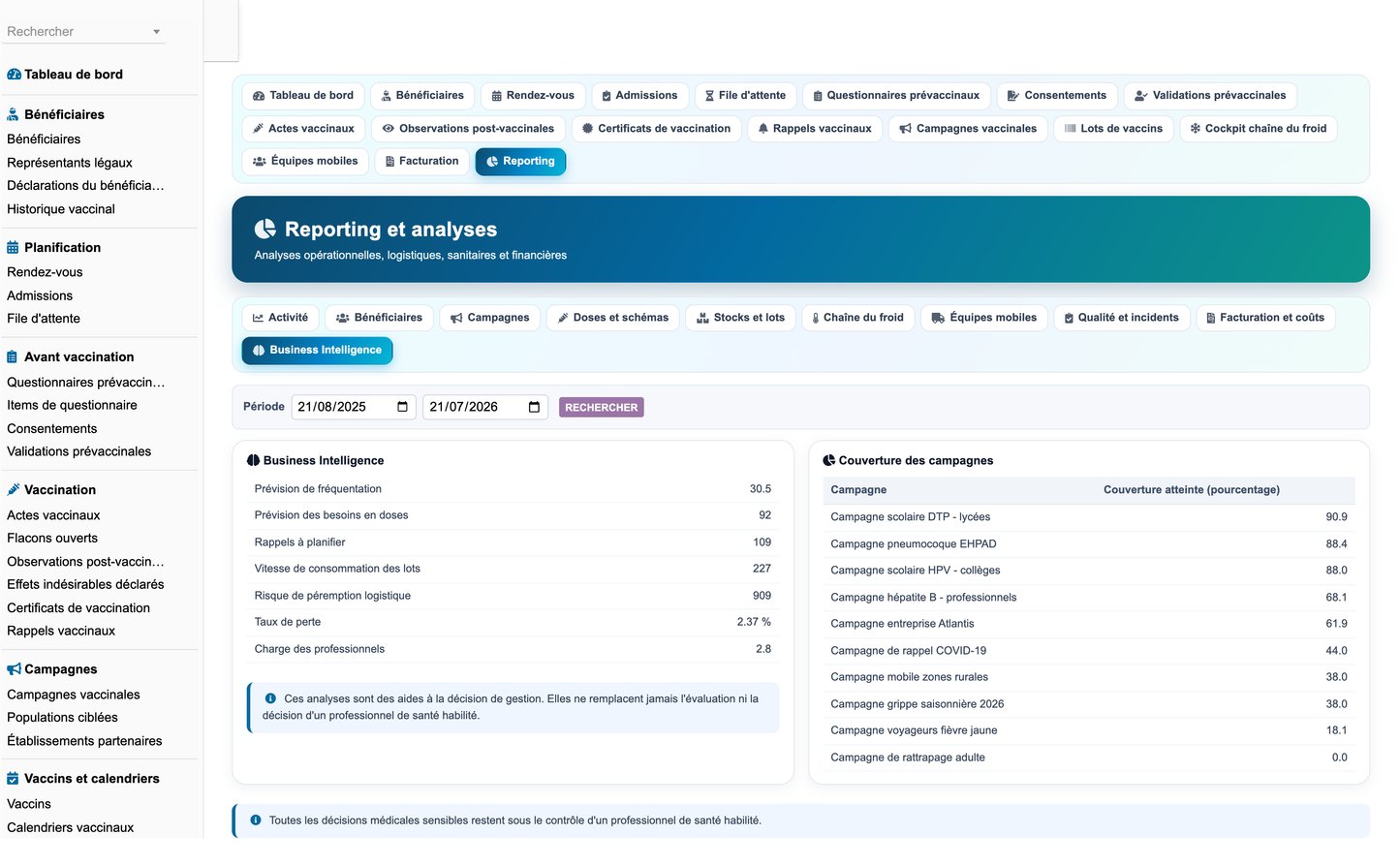
· Reporting is organised in ten axes with a period filter: activity, beneficiaries, campaigns, doses and schemes, stock and lots, cold chain, mobile teams, quality and incidents, billing and costs, and business intelligence.
· The axes cover activity per period, centre, campaign and professional; beneficiaries, age bands and target groups; appointments, confirmations, absences and cancellations; admissions; vaccinations, first doses, boosters, complete and incomplete schemes; vaccines, lots, doses received, administered, reserved, lost and destroyed; stock, expiries, quarantines and transfers; cold chain, temperatures and excursions; equipment and maintenance; mobile teams; certificates; reported adverse events; incidents and quality; billing, collections, unpaid amounts, costs, margins, profitability and satisfaction.
· Every figure is rendered as a table or a chart and can be printed. Access is restricted by the reporting permission, and cost figures by the costs permission.
53. Business Intelligence
· The business intelligence axis provides attendance forecasting, dose requirement forecasting, reminder volume ahead, lot consumption speed, logistic expiry risk, loss rate and professional workload.
· These analyses are decision support for management only. They are never turned into an automatic medical decision, and the page states so explicitly.
54. API
· The REST API exposes all 42 objects through 210 CRUD routes plus an aggregated reporting route, under /api/index.php/vaccinationcenter/.
· It provides authentication through the standard DOLAPIKEY header, per-group permission enforcement, pagination, universal filter syntax, whitelisted sort fields, structured JSON errors and syslog logging. A request with a bogus key receives 401; a request for a non-existent record receives a structured 404.
55. Security
· The module applies CSRF protection on every form, XSS escaping on every output, escaped SQL values and whitelisted SQL identifiers, strict input validation, granular permissions, logging of modifications through the audit trigger, locking of validated acts, controlled downloads, API security, and no sensitive data in the logs.
· The audit trail records the user, the date, the action, the object and its label for every create, modify and delete on the module's objects, and is written into the Dolibarr agenda.
· Setup values are bounded and whitelisted server-side rather than trusted as posted.
56. Demo Data
· The configuration page carries a Demonstration data sets section with a Populate demonstration data button and a Purge demonstration data button.
· The generator creates fictitious centres, posts, health professionals, beneficiaries, legal guardians, partners, insurances, vaccines, schedules, schemes and scheme doses, campaigns and target populations, appointments, admissions, questionnaires and their items, consents, pre-vaccination validations, vaccination acts, opened vials, observations, reported adverse events, certificates, reminders, lots, consumable stock, movements, inventories, refrigerated units, temperature readings, excursions, quarantines, mobile teams and missions, equipment, maintenance, billing, incidents and quality reviews: more than 6 700 rows in total, together with the matching native third parties and products.
· All demonstration data is clearly identified as fictitious and is tagged with a technical marker. The purge removes only the tagged rows, cascades onto user-created children of demonstration parents, asks for a strong confirmation, and reports the number of rows removed. Real data is never affected.
· The dataset is deliberately realistic rather than merely present: activity is spread across twelve months so every monthly chart is populated, a slice of today's activity is forced so the daily tiles are never zero, appointment slots are sequential per post so occupancy stays plausible, and the no-show, cancellation, conformity and coverage rates are drawn to credible values.
57. Installation
· Copy the vaccinationcenter folder into htdocs/custom/ of the Dolibarr installation, then enable Vaccination Center Management from Setup, Modules, Health tab.
· Open the module configuration page to adjust the slot duration, the observation duration, the waiting alert threshold, the lot expiry alert window, the reminder lead time, the default cold chain thresholds and the double-check mode, and optionally to populate the demonstration dataset.
· Compatibility: Dolibarr 16 to 23, PHP 7.1 to 8.3, MySQL and MariaDB, on Apache or Nginx, Linux or Windows Server, in mono-entity or multi-entity, multi-site and multi-centre configurations. The interface is responsive on desktop, tablet, smartphone, reception desk, vaccination post, supervision station, mobile terminal and cash desk.
58. Deliverables
· module_vaccinationcenter-1.0.zip: the installable module archive, containing the vaccinationcenter folder directly at its root, in accordance with the Dolibarr structure.
· screenshots/: 69 screenshots of the module in operation, captured at 3200 by 1980 pixels.
· Vaccination_Center_User_Training_Manual_FR.pdf: the illustrated French user and training manual.
· Vaccination_Center_Complete_Features_EN.docx: this functional documentation.
· Vaccination_Center_Technical_Documentation_EN.md: the technical documentation covering the architecture, the SQL schema, the classes, the triggers, the permissions, the API, the scheduled jobs, installation, upgrade, removal, security, the synchronisation mechanism and the extension points.
Medical scope and publisher
This module is a management tool. It never replaces clinical assessment, the decision to administer or withhold a vaccine, the identification of a contraindication, the decision to postpone a vaccination or amend a vaccination schedule, medical prescription, the handling of an adverse event, referral to emergency care, the applicable official recommendations, or the validation of a medical act. All sensitive medical decisions remain under the control of an authorised health professional.
Vaccination schedules, eligibility rules, recommendations, intervals and regulatory requirements are fully configurable so that they can be adapted to the country, the region, the population, the age group, the campaign, the vaccine type, the applicable recommendations and the internal procedures of the centre.
Published by DoliResources - www.doliresources.com - Copyright © DoliResources


