
Discover powerful Dolibarr extensions designed to automate your business processes
Vehicle Rental (Location de Véhicules) turns Dolibarr into a complete management platform for a...
Couldn't load pickup availability


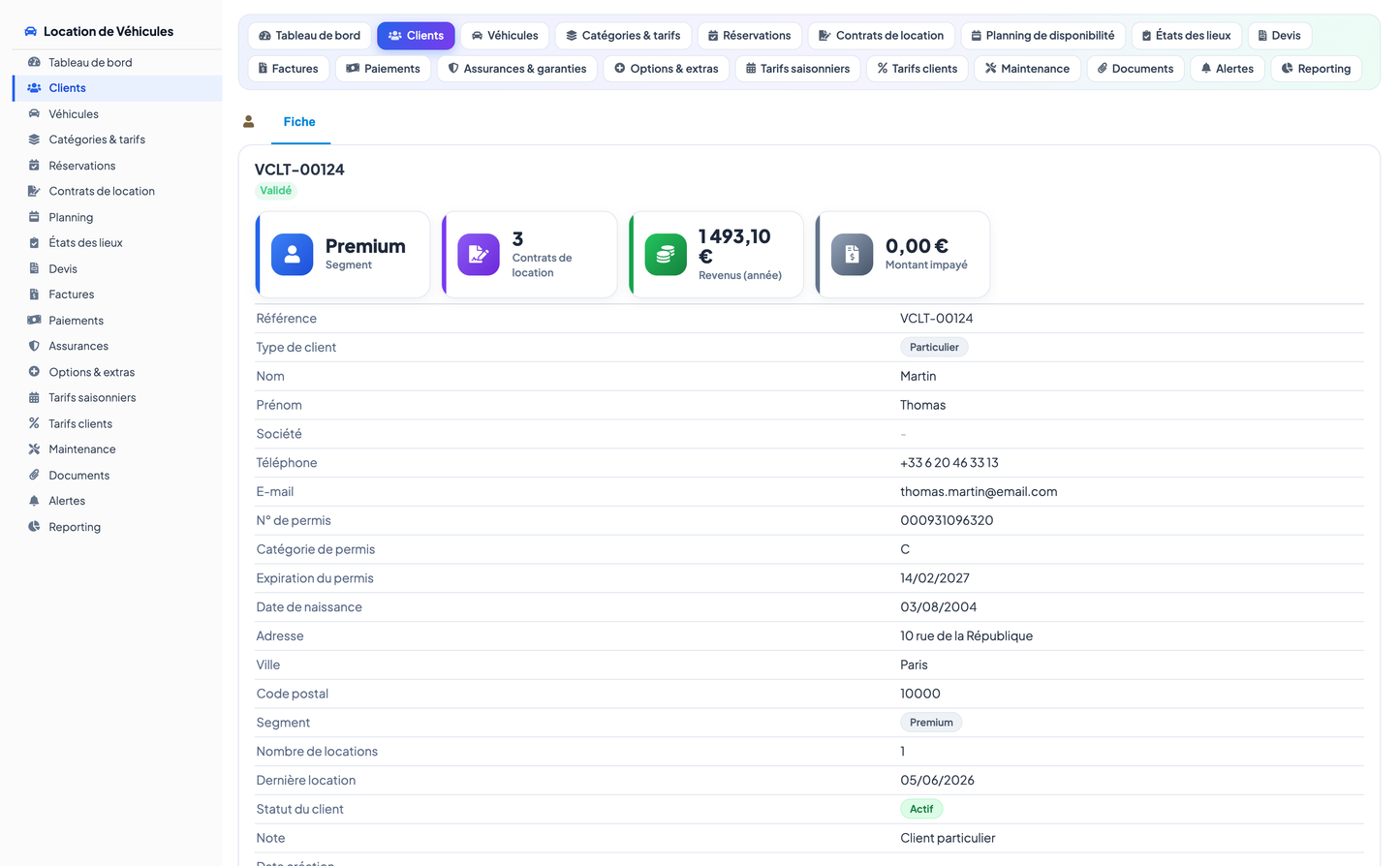
Vehicle Rental (Location de Véhicules) turns Dolibarr into a complete management platform for a car- or vehicle-rental agency. It centralises the whole rental lifecycle — from the customer file and the vehicle catalogue, through reservations, rental contracts, inspections and invoicing, down to payments, pricing configuration and decision-support reporting.
The module is designed around the operational reality of a rental desk: preventing double bookings, applying the right rate at the right moment (base rate, seasonal rate, customer-specific discount), tracking the state of each vehicle at pickup and return, and keeping a live financial picture of the business. It integrates natively with Dolibarr's Third Parties and Users modules and follows the standard Dolibarr look-and-feel with a modern, dashboard-first interface.
· A single source of truth of every rental in one place — no re-keying of customer, vehicle or pricing data.
· Fewer double bookings through real-time availability control and a weekly planning board.
· Faster, more accurate quoting and invoicing with base, seasonal and per-customer rate rules applied automatically.
· Full financial visibility with a live dashboard of revenue, fleet utilisation, unpaid invoices and deadlines.
· A realistic demonstration dataset (customers, vehicles, reservations, contracts, invoices, payments) so the module is usable immediately.
The module covers the following functional areas, accessible from the left-hand navigation menu and the in-page tab bar:
Dedicated customer files for individuals and companies: first/last name, company, phone, e-mail, driving-licence number, licence category and expiry, date of birth, full address, city and postal code. Each customer carries a commercial segment (Standard, Loyal, Premium, Corporate), a rental counter, the date of the last rental and a status (Active, Pending, Inactive). Customer data auto-populates contracts, quotes and invoices to eliminate re-entry errors.
A rental fleet organised by category (city car, sedan, SUV/4x4, minivan, utility van, heavy truck, motorcycle). Each vehicle records its registration plate, brand, model, fuel type, gearbox, number of seats and doors, colour, first-registration date, mileage, daily and weekly rate, deposit, fuel level, home branch and real-time status (Available, Rented, Reserved, In maintenance, Unavailable).
A rate catalogue per vehicle category holding the daily, weekly and monthly rate, the security deposit, the insurance excess, the included mileage and the extra-kilometre price. Rates are applied automatically when a contract, quote or invoice is produced.
Season definitions (Low / Mid / High season) with a date range and a rate coefficient per category, so prices adapt automatically to the period of the year (e.g. +25% in high season).
Negotiated discounts per customer or per segment (e.g. Premium -15%, Corporate -12%, Loyal -8%), optionally limited to a category and a validity window.
Reservations recorded before they are turned into a contract, with pickup and return branch, period, estimated amount and a status (Pending, Confirmed, Converted, Cancelled). Reservations feed the availability planning board to prevent double bookings.
The heart of the module. Each contract links a customer and a vehicle over a period, and captures the pickup and return mileage, the included mileage, the daily price, the rental amount, the insurance and options amounts, any discount, the amounts excluding and including tax, the deposit, the electronic-signature state (Unsigned, Awaiting, Signed) and the contract status (Draft, Active, In progress, Completed, Overdue).
A weekly board with one row per vehicle and one column per day, showing live rentals and confirmed reservations as coloured blocks and free days as 'Available'. This is the anti-double-booking control centre; it can be browsed week by week.
Pickup and return condition reports per contract: mileage reading, fuel level, cleanliness, damage noted and an overall result (Compliant, With reservations, Dispute).
Rental quotes with customer, vehicle/category, period, amounts and a validity date, tracked through their lifecycle (Draft, Sent, Accepted, Declined, Expired).
Rental invoices generated from contracts, with issue date, due date, amounts, paid amount and a status (Draft, Generated, Sent, Paid, Unpaid, Overdue).
Customer payments linked to invoices, with payment method (Card, Cash, Bank transfer, Cheque, Online), a transaction reference and a status (Pending, Validated, Declined).
A catalogue of protection products offered at rental time (Comprehensive, Third-party plus, Third-party, Excess waiver) with a daily rate and an excess amount.
A catalogue of add-ons (GPS, baby seat, booster seat, additional driver, on-board Wi-Fi, snow chains, bike rack) with a daily rate and available stock.
Maintenance and preparation operations per vehicle (oil change, service, cleaning/valet, tyres, repair, roadworthiness test), with planned and completion dates, mileage, cost, provider and status.
Digital documents attached to contracts and customers (rental contract, driving licence, ID, invoice, inspection report, insurance certificate, photos) with an electronic-signature flag.
Automatic operational alerts (overdue return, unpaid invoice, maintenance due, insurance renewal, upcoming reservation, missing document, licence expiring) with a severity and a handling status.
The home dashboard summarises the whole business in four zones:
· Rental activity & fleet - total vehicles, available, rented out, in maintenance, active contracts and active customers.
· Revenue & billing - a revenue-composition donut (rental / insurance / options), revenue this month and this year, average basket and the number and amount of unpaid invoices, plus a 12-month revenue trend and a contracts-by-status breakdown.
· Utilisation & performance - a fleet-utilisation gauge, a collection-rate gauge, contracts this month, average rental duration, average daily rate, and fleet/revenue-by-category charts.
· Alerts & deadlines - open alerts, overdue returns, unpaid invoices, upcoming reservations and a live table of the most recent open alerts.
A dedicated analytics page provides decision-support charts: revenue by vehicle category, fleet by category and by fuel type, the top-10 vehicles by revenue, invoices by status, payments by method, fleet by branch, contracts by status and a full-width 12-month revenue trend.
The weekly planning board shows, for each vehicle, the days it is rented (with the customer name and contract reference) or reserved, and the days it is available. It is the operational tool that prevents double bookings and gives an at-a-glance view of fleet occupation.
The module ships 16 business objects, each with its own list and detail (card) page. Hub objects (Customer, Vehicle, Contract) show a KPI cockpit and related information on their card.
|
Object |
Database table |
Purpose |
|
Customer |
llx_loc_client |
Customer file (individual/company), licence, segment |
|
Vehicle |
llx_loc_vehicle |
Rental fleet vehicle, category, rates, status |
|
Category |
llx_loc_category |
Vehicle category and base tariffs |
|
Seasonal rate |
llx_loc_season |
Season definition and rate coefficient |
|
Customer rate |
llx_loc_clientrate |
Negotiated discount per customer/segment |
|
Reservation |
llx_loc_reservation |
Booking before contract conversion |
|
Rental contract |
llx_loc_contract |
Rental agreement (hub), amounts, signature |
|
Quote |
llx_loc_quote |
Rental quotation |
|
Invoice |
llx_loc_invoice |
Rental invoice and payment status |
|
Payment |
llx_loc_payment |
Customer payment, method, status |
|
Inspection |
llx_loc_inspection |
Pickup/return condition report |
|
Insurance |
llx_loc_insurance |
Protection-cover catalogue |
|
Option |
llx_loc_option |
Options & extras catalogue |
|
Maintenance |
llx_loc_maintenance |
Fleet maintenance operation |
|
Document |
llx_loc_document |
Digital document, e-signature |
|
Alert |
llx_loc_alert |
Automatic operational alert |
Access is governed by seven permission groups, each with read / create-modify / delete rights (reporting is read-only), plus a module-administration right:
· Customers - customers and customer rates.
· Vehicles - vehicles, categories and maintenance.
· Contracts - reservations, contracts, quotes and inspections.
· Billing - invoices and payments.
· Pricing - seasonal rates, insurance and options.
· Documents - documents and alerts.
· Reporting - dashboards and analytics (read-only).
Read and write rights are granted by default on activation so the module is immediately usable; delete and administration rights are off by default. All data is multi-company (entity) aware.
· Copy the 'locationvehicules' folder into Dolibarr's htdocs/custom directory (or install the ZIP via Home > Setup > Modules > Deploy/install external module).
· Enable 'Vehicle Rental' from Home > Setup > Modules. Tables, menus and rights are created automatically.
· On first activation a realistic demonstration dataset is generated so every screen is immediately populated.
· The demo dataset can be reinstalled or removed at any time from the module's Configuration page.
© 2026 DoliResources — www.doliresources.com


