
Discover powerful Dolibarr extensions designed to automate your business processes
Wedding Hall / Advanced Wedding Planner Management transforms Dolibarr ERP into a complete, end-to-end management platform for the wedding and reception industry. From...
Couldn't load pickup availability


Wedding Hall / Advanced Wedding Planner Management transforms Dolibarr ERP into a complete, end-to-end management platform for the wedding and reception industry. From the first prospect enquiry to the final invoice and post-event satisfaction survey, every operational, commercial and financial step of a wedding is handled inside a single, coherent workspace.
The module unifies venue booking, event planning, guest and seating management, supplier coordination, contracting, and revenue tracking. It builds natively on Dolibarr's proven third-party, product, invoicing and agenda foundations, so wedding-specific processes stay fully connected to accounting, CRM and document management.
· Wedding halls & reception venues: salle de mariage / salle des fêtes operators managing bookings, occupancy and catering.
· Wedding planners: independent planners orchestrating events, suppliers and timelines.
· Reception & banqueting venues: hotels, châteaux and estates renting spaces for celebrations.
· Event agencies: full-service agencies delivering turnkey weddings and receptions.
Whether you run a single hall or a portfolio of venues, the module scales from one-person planning studios to multi-team event organisations.
The module is powered by a generic, key-driven object engine. Every business entity is described declaratively (fields, labels, statuses, permissions) and the engine renders a consistent list view and card view for each one. This guarantees a uniform user experience across all 21 business objects and makes the module easy to extend and localise.
· List view with sortable columns, pagination and quick filters.
· Detailed card view with tabbed sections and contextual actions.
· Coloured status pills that make record states readable at a glance.
· Full-text search and multi-criteria filtering.
· Show/hide column selector so each user tailors their own view.
|
Group |
Object |
Purpose |
|
Catalogue |
Space types |
Classify venues (ballroom, garden, marquee, terrace). |
|
Catalogue |
Spaces / Halls |
The bookable rooms and reception areas with capacity. |
|
Catalogue |
Services |
Decoration, catering, entertainment and media services. |
|
Catalogue |
Packages |
Bundled wedding offers combining spaces and services. |
|
Catalogue |
Package lines |
The individual components that make up each package. |
|
Catalogue |
Seasonal pricing |
Date-driven rate adjustments (high/low season). |
|
CRM |
Clients |
Confirmed customers and their contact history. |
|
CRM |
Prospects |
Leads and enquiries flowing through the sales pipeline. |
|
Events |
Events |
The wedding / reception, its date, space and status. |
|
Events |
Event lines |
Services, packages and items booked for the event. |
|
Events |
Guests |
Invitees with RSVP status, menu and dietary details. |
|
Events |
Tables / Plan |
Seating tables and the visual table plan. |
|
Resources |
Equipment |
Chairs, tables, sound, lighting and décor inventory. |
|
Resources |
Equipment moves |
Check-out / return tracking of equipment per event. |
|
Resources |
Suppliers |
Caterers, decorators, DJs, photographers, florists. |
|
Resources |
Staff |
Teams and staff assigned to events. |
|
Resources |
Maintenance |
Upkeep and repair records for spaces and equipment. |
|
Finance |
Payments |
Deposits, balances and receipts against events. |
|
Finance |
Contracts |
Wedding contracts with a full lifecycle. |
|
Operations |
Tasks |
Preparation and follow-up tasks with workflow. |
|
Automation |
Automation rules |
Trigger-based alerts and automated reminders. |
Grouping: Catalogue (6) • CRM (2) • Events (4) • Resources (5) • Finance (2) • Operations (1) • Automation (1) = 21 objects.
The module follows the natural life of a wedding project, from first contact to post-event satisfaction. Each stage maps to one or more objects and updates status pills and dashboard KPIs automatically.
1. Prospect — A new lead enters the CRM sales pipeline.
2. Enquiry — The couple's request is qualified and detailed.
3. Venue visit — A site visit / meeting is scheduled and logged.
4. Quote — A tailored quotation is produced from packages & services.
5. Wedding contract — The signed contract formalises the engagement.
6. Date reservation — The wedding date and space are locked, blocking conflicts.
7. Event planning — Services, guests, tables and timeline are built out.
8. Supplier management — Caterers, DJ, florist and others are booked & confirmed.
9. Preparation — Tasks, equipment moves and staff assignments are completed.
10. Wedding day — The event runs; on-site operations are tracked.
11. Final invoicing — Balance is invoiced and payments are reconciled.
12. Client satisfaction — Feedback is captured to close the loop.
A dedicated left-hand menu gives fast access to every area of the module, organised from high-level dashboards down to configuration.
|
Menu entry |
What it opens |
|
Dashboard |
Executive KPI overview, alerts and charts. |
|
Events |
All weddings / receptions in list and card views. |
|
Event Pipeline (Kanban) |
Drag-and-drop lifecycle board of every event. |
|
Planning |
Reservation calendar with conflict detection. |
|
Workflow |
Cross-object task and stage workflow. |
|
Tasks |
Operational tasks for preparation and follow-up. |
|
Clients |
Confirmed customers and their history. |
|
Prospects |
CRM sales pipeline of leads and enquiries. |
|
Guests |
Guest lists and RSVP tracking. |
|
Table Plan |
Visual seating chart per event. |
|
Spaces & Halls |
Bookable rooms, capacities and space types. |
|
Services |
Decoration, catering, entertainment, media catalogue. |
|
Packages |
Bundled wedding offers. |
|
Seasonal Pricing |
Date-driven rate rules. |
|
Equipment |
Inventory and equipment moves. |
|
Suppliers |
External partner directory. |
|
Staff |
Teams and staff assignments. |
|
Contracts |
Wedding contracts and their lifecycle. |
|
Payments |
Deposits, balances and receipts. |
|
Invoicing |
Invoice generation and tracking. |
|
Space Board |
Occupancy overview across spaces. |
|
Automations |
Alert and reminder rules engine. |
|
Reporting |
Revenue, occupancy and conversion analytics. |
|
Configuration |
Module settings, demo data, permissions. |
A polished landing dashboard surfaces the metrics that matter, with KPI cards, alert tiles and charts for instant situational awareness.
· Upcoming weddings and confirmed reservations.
· Expected revenue vs. collected revenue.
· Pending payments and outstanding balances.
· Occupancy rate across spaces and dates.
· Active prospects and lead-to-client conversion rate.
· Confirmed guest counts and average margin per event.
· Alert tiles for items needing attention, plus trend charts.
Every event moves visually across a Kanban board, so the whole team sees where each wedding stands at a glance.
· Columns: Request → Quote → Confirmed → Preparation → Ongoing → Completed → Cancelled.
· Drag-and-drop stage changes update statuses and KPIs instantly.
· Calendar-based planning of dates and spaces.
· Automatic double-booking / conflict detection prevents overlapping reservations.
· Stages: New → Contacted → Meeting → Quoted → Signed → Lost.
· Conversion tracking measures pipeline performance and win rate.
· RSVP states: Attending, Pending, Declined, Maybe.
· Menu choices, dietary needs and children counts captured per guest.
· Tables defined by shape, zone, capacity and current occupancy.
· Seated guest lists per table and a running unseated-guest list.
· Services catalogue: decoration, catering, entertainment and media.
· Wedding packages: curated bundles combining spaces and services.
· Suppliers: caterer, decorator, DJ, photographer, florist, rental partners.
· Staff / teams: assign and coordinate the people delivering each event.
· Contracts: wedding contracts with a full lifecycle (draft to signed to closed).
· Payments: deposit and balance tracking against each event.
· Tasks: a task workflow for preparation and follow-up.
· Maintenance: upkeep records for spaces and equipment.
A rules engine watches the data and raises timely alerts so nothing slips.
· Upcoming event reminders.
· Overdue payment alerts.
· Unsigned contract warnings.
· Unconfirmed supplier notifications.
· Multilingual: French, English, Italian, German and Spanish interfaces.
· Demo data generator: populate a realistic sample dataset in one click.
· Purge: cleanly remove demo data when you are ready to go live.
Access is governed by nine right groups, each exposing Read, Write and Delete permissions, plus a dedicated Administer right for module configuration. Grant only what each role needs.
|
Right group |
Read |
Write |
Delete |
Scope |
|
Catalogue |
Yes |
Yes |
Yes |
Spaces, services, packages, seasonal pricing. |
|
Clients |
Yes |
Yes |
Yes |
Confirmed customer records. |
|
Prospects / CRM |
Yes |
Yes |
Yes |
Leads and sales pipeline. |
|
Events |
Yes |
Yes |
Yes |
Weddings, lines, guests, table plans. |
|
Finance |
Yes |
Yes |
Yes |
Contracts and payments. |
|
Resources |
Yes |
Yes |
Yes |
Equipment, suppliers, staff, maintenance. |
|
Operations |
Yes |
Yes |
Yes |
Tasks and preparation workflow. |
|
Automation |
Yes |
Yes |
Yes |
Alert and reminder rules. |
|
Reporting |
Yes |
— |
— |
Analytics and dashboards (read-oriented). |
|
Administer |
— |
— |
— |
Module setup, demo data, global settings. |
|
Profile |
Typical rights |
|
Administrator |
Full access to all groups plus Administer. |
|
Venue Director |
Read/Write across all operational groups; Reporting. |
|
Wedding Planner |
Events, Guests, Table Plan, Resources, Tasks. |
|
Sales |
Prospects/CRM and Clients; read on Catalogue & Events. |
|
Event Manager |
Events, Resources, Operations, Finance (read). |
|
Accountant |
Finance (full), Reporting; read on Events & Clients. |
|
Assistant |
Write on Tasks, Guests; read elsewhere. |
|
Read-only |
Read on selected groups; no write or delete. |
The module reuses Dolibarr's core objects rather than duplicating them, so wedding data flows straight into your existing accounting, CRM and document processes.
|
Module area |
Native Dolibarr object |
How it is used |
|
Clients & suppliers |
Third parties (Societe) |
Every client and partner is a native company record. |
|
Contacts |
Contacts |
Couples, guests-of-honour and supplier contacts. |
|
Services & packages |
Products & Services |
Catalogue items map to native product/service entries. |
|
Quotes |
Quotes (Propal) |
Wedding quotations use native commercial proposals. |
|
Bookings / orders |
Orders |
Confirmed bookings feed native sales orders. |
|
Final invoicing |
Invoices |
Deposits and balances become native customer invoices. |
|
Deposits & balances |
Payments |
Receipts recorded through native payment objects. |
|
Reconciliation |
Bank |
Payments tie into native bank accounts. |
|
Planning & reminders |
Agenda |
Visits, tasks and alerts appear in the native agenda. |
|
Event delivery |
Projects |
Each wedding can map to a native project for tracking. |
|
Documents |
ECM / GED |
Contracts and files stored in the native document manager. |
|
Communication |
Emailing |
RSVP and reminder mailings via native emailing. |
|
Access control |
Users |
Permissions leverage native Dolibarr user rights. |
The following walkthrough covers the main end-to-end workflow. Each step is available from the module's left-hand menu.
Step 1 — Create a prospect. Open Prospects and add the enquiry with couple details and event date; the lead enters the sales pipeline.
Step 2 — Convert to client. Once qualified, convert the prospect into a Client record, carrying over contact details.
Step 3 — Create an event. From Events, create the wedding: set the date, expected guest count and initial status.
Step 4 — Assign a space. Attach a Space/Hall; the planner checks the calendar and conflict detection confirms availability.
Step 5 — Add services & packages. Add event lines from the Services catalogue and Packages to build the offer.
Step 6 — Generate the contract. Produce the wedding Contract; track it through its lifecycle to signature.
Step 7 — Record the deposit. Register the deposit under Payments; the dashboard updates collected revenue and pending balance.
Step 8 — Manage guests & table plan. Capture guests and RSVPs, then arrange the visual Table Plan by seating guests at tables.
Step 9 — Final invoicing. Invoice the balance; payments reconcile against the event and clear the pending amount.
Step 10 — Reporting. Review revenue, occupancy and conversion in Reporting to close the project.
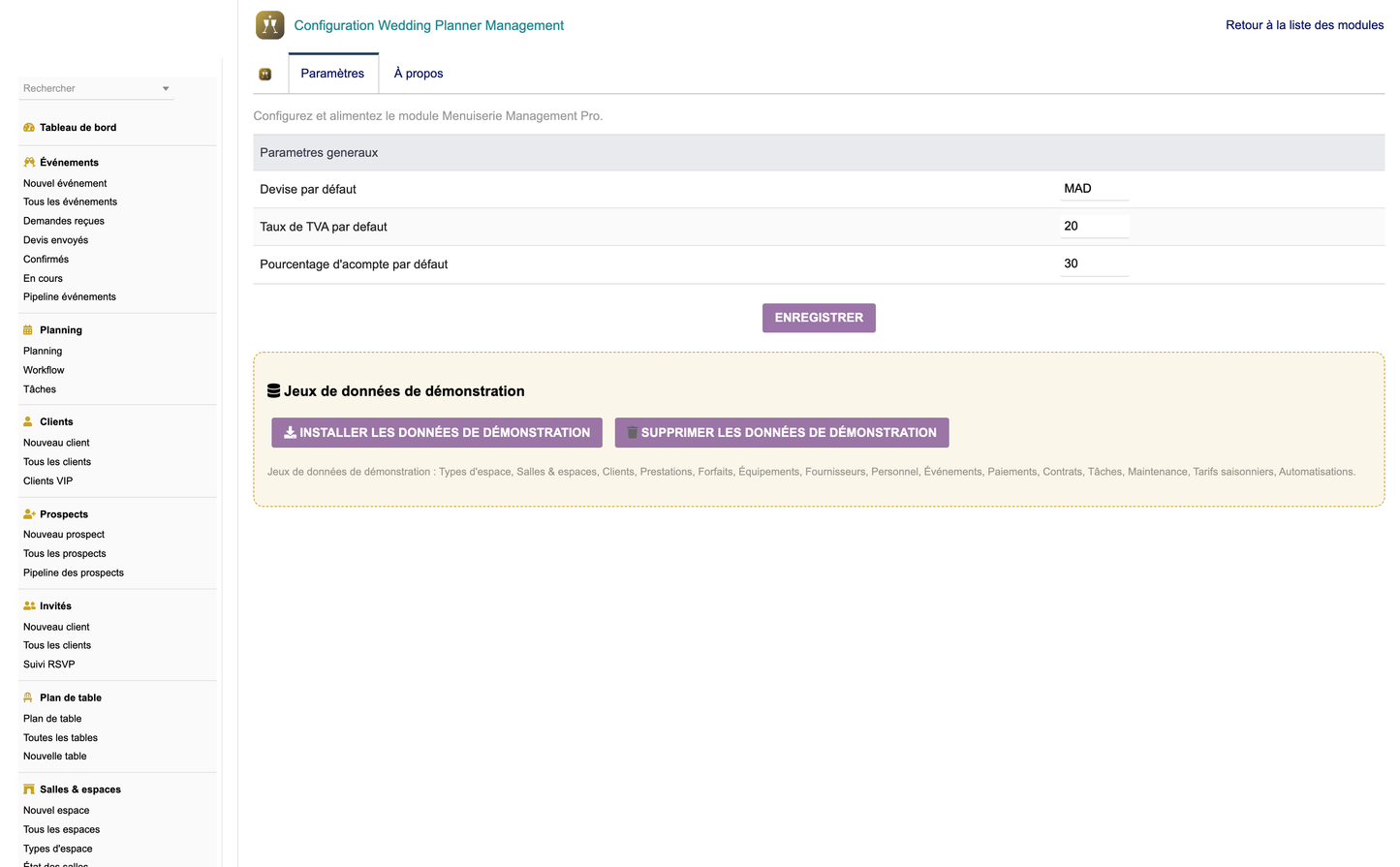
· Go to Configuration within the module.
· Click Generate demo data to populate sample spaces, clients, events, guests and payments.
· Explore the module with realistic content to learn the workflow.
· When ready for production, click Purge / Remove demo data to clear all sample records cleanly.
1. Copy the module — Place the weddingplannermanagement folder into htdocs/custom/ of your Dolibarr installation.
2. Enable the module — Log in as administrator and go to Home > Setup > Modules/Applications; find the module and toggle it on.
3. Set permissions — Open the module's permissions and grant the appropriate right groups to each user or group.
4. Configure — Use the module's Configuration page to set options and, optionally, generate demo data.
Requirements: Dolibarr 17 or later running on PHP 8.
Wedding Hall / Advanced Wedding Planner Management — v1.0.0 • © DoliResources • www.doliresources.com


